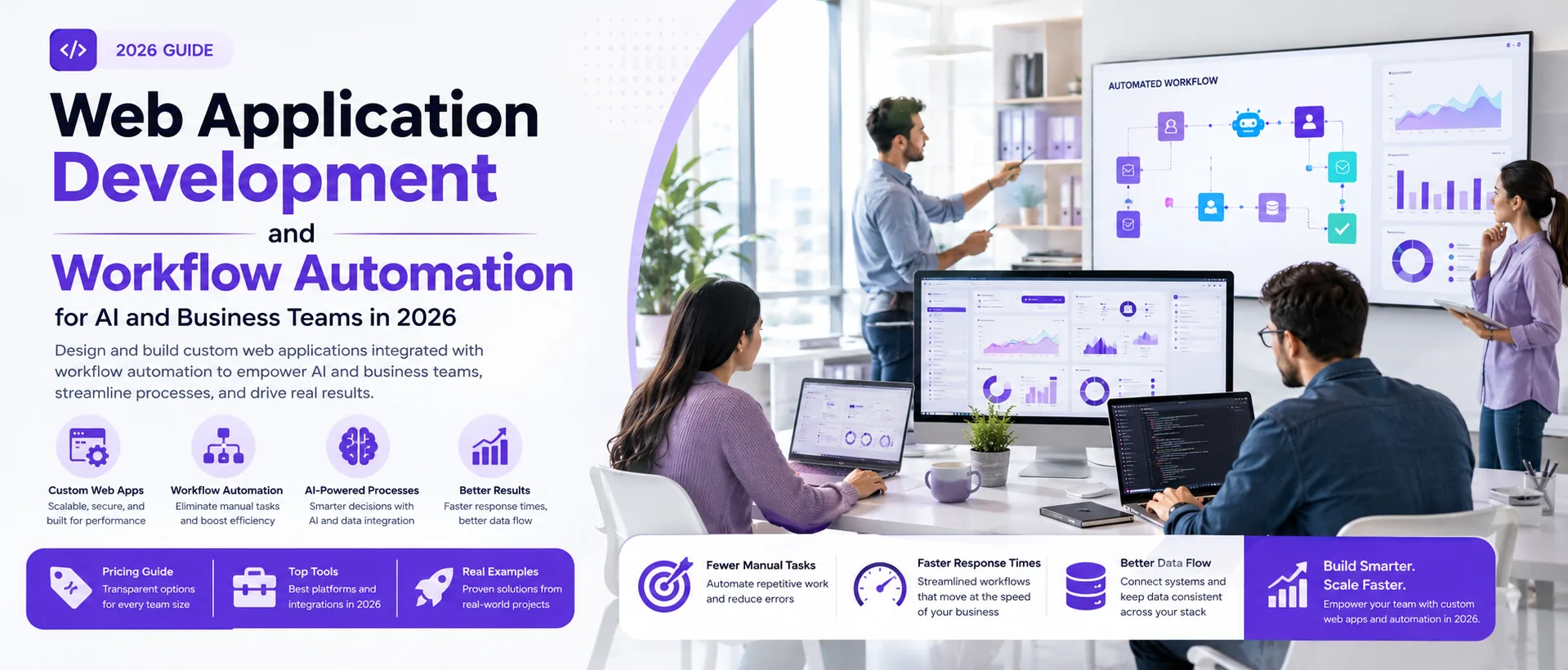
Learn how to design and build custom web applications integrated with workflow automation to empower AI and business teams in 2026. This article offers practical steps, real project examples, and tool recommendations to streamline AI-driven business processes effectively.
Introduction: Why Web Apps and Workflow Automation Matter for AI and Business Teams in 2026
If you lead an AI-driven startup or business team, web application development is no longer just about building a digital product—it's about creating the backbone for automation, speed, and adaptability. In 2026, the pressure to automate and orchestrate complex workflows is higher than ever. Off-the-shelf SaaS rarely fits the unique data flows and AI integrations that modern teams demand, while manual processes slow down growth and innovation.
Today's AI and business teams are juggling more moving parts: custom data pipelines, machine learning models, and multi-platform collaboration, often across distributed teams. Without tailored web apps and workflow automation, even high-performing teams risk wasting hours on repetitive tasks, creating data silos, and missing out on rapid scaling opportunities. As highlighted in Business Process Automation 2026: Steps & Examples, automation is now a core pillar of digital strategy, replacing manual work with faster, more accurate, and scalable processes.
The latest guides on AI and automation show that 2026 trends go far beyond basic efficiency. Modern web apps are built for flexibility—connecting AI services, business logic, and third-party tools in ways that generic SaaS can't match. Teams that can rapidly prototype, iterate, and automate custom workflows are pulling ahead, while others struggle to keep up.
This article gives you a practical roadmap for web application development and workflow automation in 2026. You'll see actionable steps, real project examples, and a clear path to decide whether to build in-house or partner with a studio. For more on automation software options, check our Workflow Automation Software: How It Works and What to Buy in 2026 or explore our portfolio case studies for inspiration.
Understanding the Buyer’s Pain: Challenges in AI and Business Team Operations
For founders, product owners, and operations leaders, the promise of web application development and workflow automation is real—but so are the blockers. In 2026, AI business teams are under pressure to deliver faster, automate smarter, and scale without ballooning headcount. Yet, most teams run into the same core pain points:
- Workflow complexity: AI-powered teams often juggle a patchwork of tools—analytics dashboards, CRM systems, custom ML models, and legacy databases. Each has its own data format and update cycle. Without workflow automation, teams waste hours on repetitive data entry, context switching, and error-prone handoffs. As noted in industry guides, automation is now essential to keep up with the pace of modern business processes.
- Integration gaps: Many business teams discover that their core systems—like sales pipelines, support chatbots, or inventory management—do not talk to each other out of the box. This leads to manual exports, missed triggers, and lost insights. According to business process automation resources, bridging these gaps with custom web apps or workflow automation can dramatically reduce friction and error rates.
- Scaling issues: What works for a five-person startup breaks down at 50 or 500 users. Manual processes that once seemed manageable become bottlenecks, especially when onboarding new staff or rolling out new AI features. Teams often lack the internal resources to redesign workflows or build integrations that scale securely and reliably.
- Change management and skill gaps: Even with the right tools, business teams may struggle to adopt new automated workflows or maintain custom software. Training, documentation, and ongoing support are often overlooked, leading to stalled projects or shadow IT workarounds.
These challenges are not unique. Many teams start by mapping their current workflows and identifying automation opportunities—a process we cover in detail in How to Conduct a Workflow Audit to Identify Automation Opportunities for SMBs. For a practical look at AI automation tools, see AI Automation Tools for Small Business 2026: Practical Guide to Smarter Operations. For more on best practices in workflow automation, industry blogs highlight how leading teams are approaching these issues in 2026.
Key Components of Modern Web Application Development for AI Workflows
Building web applications that truly empower AI and business teams in 2026 means going beyond a basic CRUD app. You need an architecture that supports automation, integrates with AI services, and adapts as your workflows evolve. Here are the core components every decision-maker should prioritize:
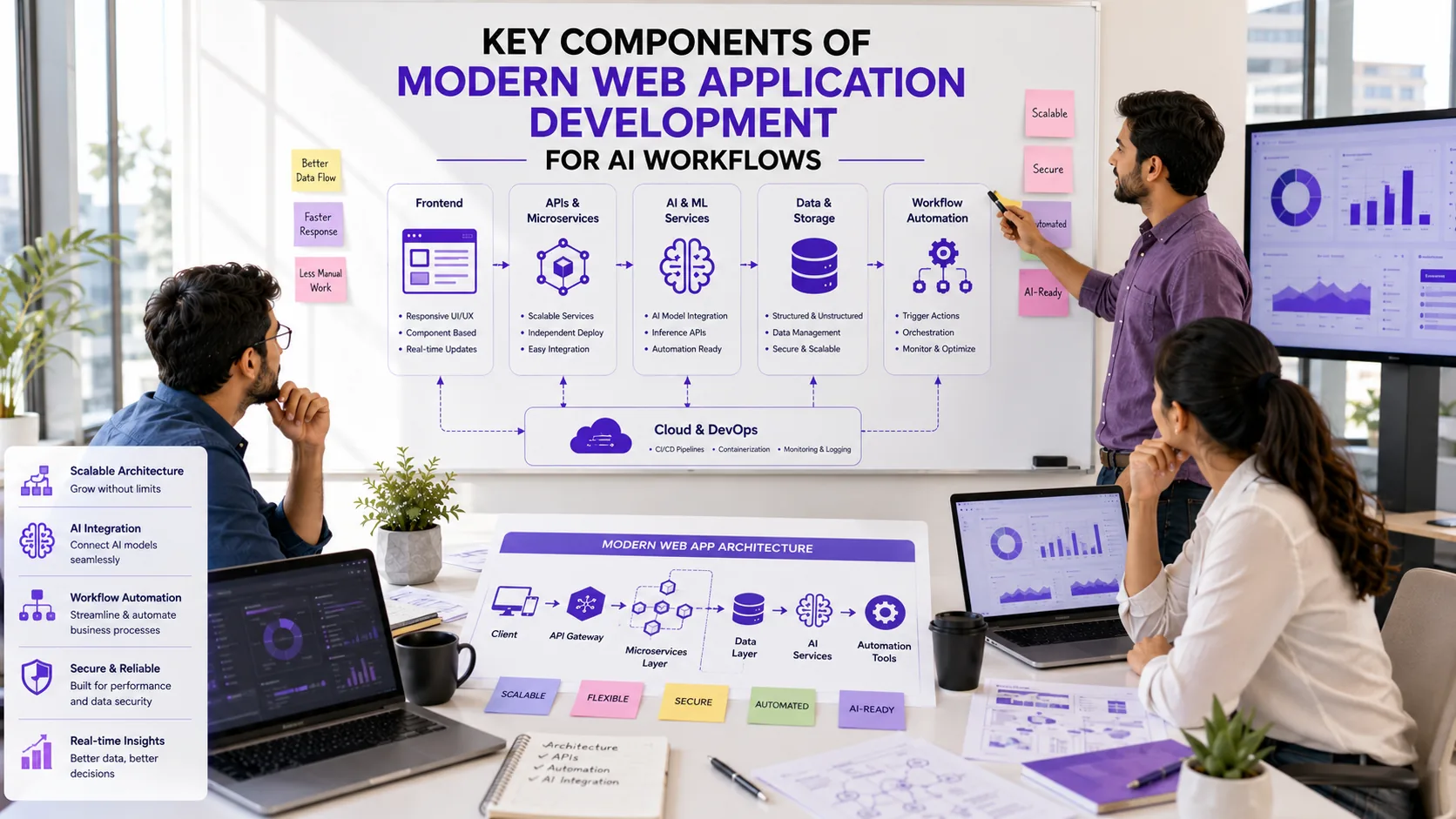
- APIs and Microservices: Modern web apps rely on robust APIs and a microservices approach. This lets you connect to AI models, external data sources, and workflow automation tools without locking your team into a monolithic stack. For example, a FastAPI backend can expose endpoints for both internal dashboards and external automation platforms.
- Real-Time Data Handling: AI-driven teams often need live updates—think dashboards, notifications, or collaborative tools. Implementing WebSockets or server-sent events ensures your users see changes as they happen, which is critical for workflow automation and decision support.
- User-Centric UX and Access Control: AI and business tools must be intuitive for non-technical users. Prioritize clear interfaces, role-based permissions, and guided workflows. According to recent industry hiring patterns, UX design for AI-enabled solutions is now a core skill for rapid application development teams.
- Automation-Ready Architecture: Your app should be designed to trigger and respond to workflow automations—whether via webhooks, event queues, or direct integration with platforms like n8n or Zapier. This enables business process automation that scales as your needs grow. For a practical overview, see Business Process Automation 2026: Steps & Examples.
- Security and Compliance: With sensitive business data and AI models in play, invest early in authentication, audit trails, and compliance checks. This protects both your users and your business as automation expands.
To see how these elements come together in a real project, check out our Flutter project scaffolding breakdown or browse our AI automation services.
For more on how AI and automation are shaping web development, this guide covers current trends and practical examples.
Step-by-Step Workflow Automation Implementation for Business Teams
Implementing workflow automation for AI and business teams in 2026 is about more than plugging in a few SaaS tools. To get real results—fewer manual tasks, faster response times, and better data flow—you need a structured approach that fits your team's unique processes and tech stack. Here is a practical step-by-step guide that reflects what works for our clients building custom web apps and automations:
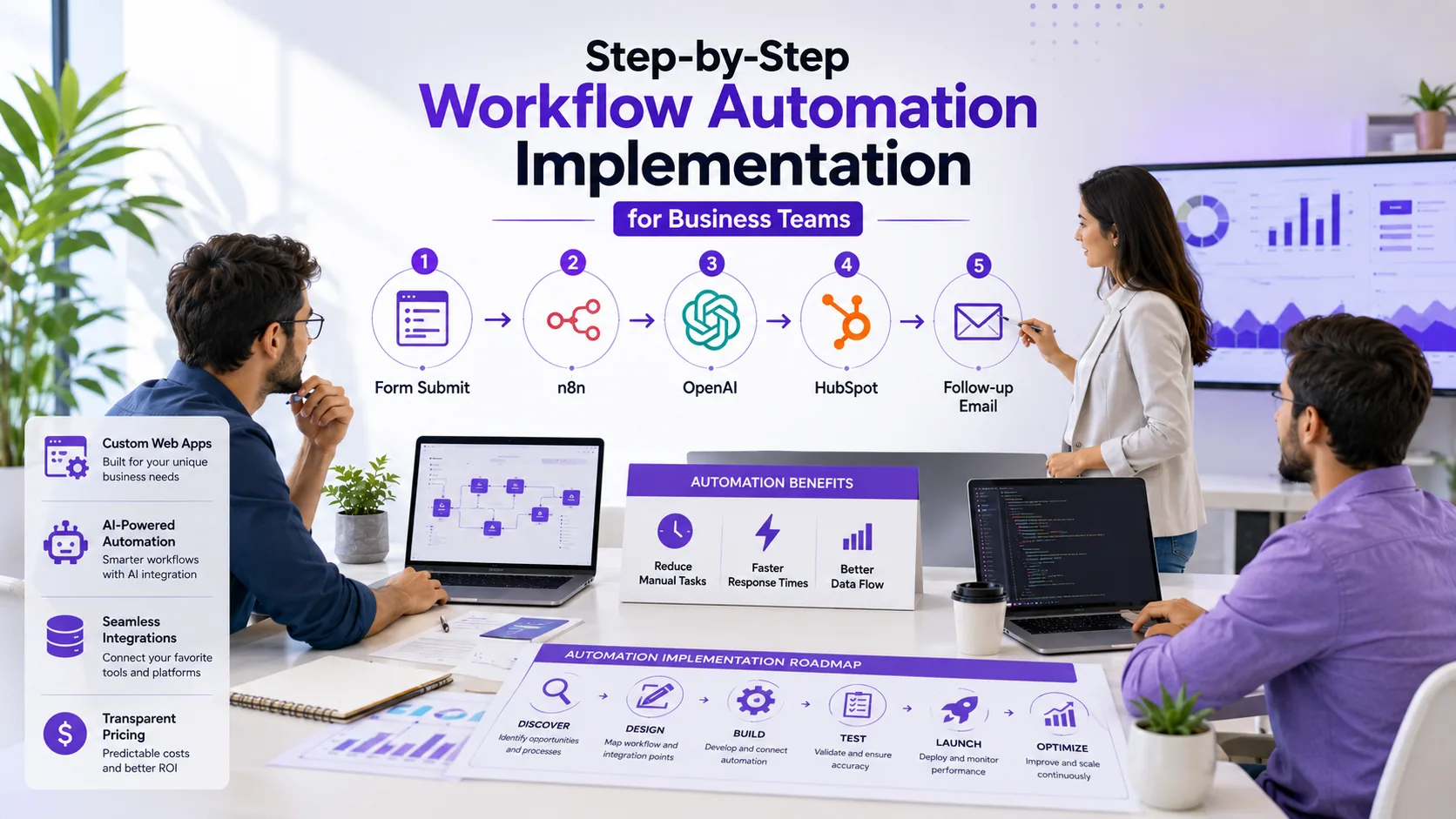
- Discovery and Process Mapping: Start by interviewing stakeholders and mapping out current workflows. Identify pain points, bottlenecks, and repetitive manual steps. Use process mapping tools or even a whiteboard session to visualize the end-to-end flow. For more on workflow audits, see our workflow audit guide.
- Define Automation Goals: Set clear objectives: What do you want to automate? Is it lead capture, data sync, approvals, or AI-driven insights? Prioritize based on business impact and feasibility.
- Select Tools and Platforms: Choose the right automation stack for your needs. For AI-driven teams, platforms like n8n (see n8n pricing) or Zapier (Zapier pricing) are popular for orchestrating multi-app workflows, while custom web apps may require backend APIs (FastAPI, Node.js) and frontend frameworks (React, Flutter Web). For a deeper dive on tool selection, check out our automation software overview and this AI automation guide.
- Integrate and Build: Connect your web app to automation platforms and APIs. This could mean building custom connectors, setting up webhook triggers, or embedding AI models for tasks like document parsing or chatbots. Test each integration with sample data before moving to live workflows.
- Test and Validate: Run end-to-end tests with real users. Validate that automations trigger as expected, data syncs correctly, and error handling is robust. Use staging environments to catch issues early.
- Deploy and Train: Roll out the automation to production. Provide training or documentation for your team. Monitor adoption and gather feedback in the first weeks.
- Iterate and Optimize: Automation is never one-and-done. Review metrics, user feedback, and system logs to spot improvement areas. Plan regular updates as your business evolves.
Tip: Start small—automate one high-impact process first, then expand. According to business process automation best practices, incremental rollouts reduce risk and help teams adapt faster.
For more hands-on examples, see our AI chatbot workflow automation guide or lead follow-up automation walkthrough. If you want expert help mapping and building your automation, Prompt Gurru offers end-to-end workflow automation services for AI and business teams.
Case Study: Custom Web App and Automation for AI Teams (Prompt Gurru Portfolio Example)
AI-driven business teams in 2026 face a constant challenge: how to scale content, automate repetitive work, and keep editorial quality high without ballooning headcount. This was the exact pain point behind our Prompt Gurru Blogs project—an automated blog pipeline built for our own studio, but designed with the same stack and workflow patterns we deploy for clients.
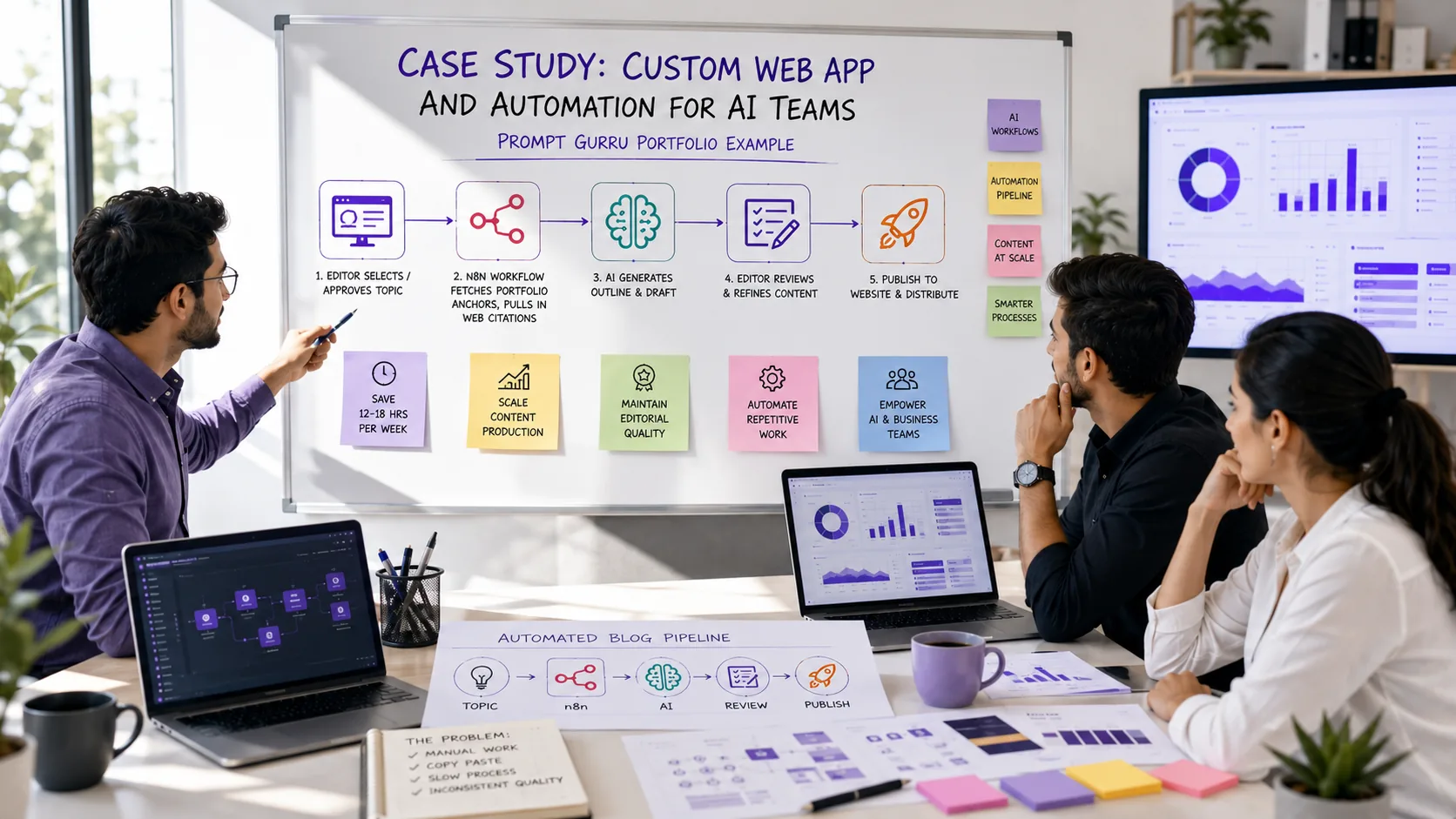
The problem: Our editorial team needed to publish high-quality, niche-targeted blog articles at scale, each grounded in real portfolio proof and optimized for search traffic. Manual drafting, editing, and workflow handoffs were slow and error-prone, making it hard to keep up with evolving AI and business automation trends.
The solution: We built a custom web application integrated with a workflow automation engine (n8n) and OpenAI's API. The system pulls from a structured content database, rotates through our portfolio anchors, and generates draft articles that match commercial search intent. Editors review, tweak, and approve content in a streamlined dashboard. The automation handles everything from topic rotation to image prompt generation and scheduled publishing.
Results: With this approach, we consistently publish 10+ long-form, portfolio-backed articles per month, each tailored to a specific buyer persona. The workflow saves our team dozens of hours per cycle and ensures every article is grounded in real project experience. This same pattern—custom web app plus workflow automation—can be adapted for AI content teams, marketing ops, or any business unit looking to scale output without sacrificing quality.
For more details and live examples, see our Prompt Gurru Blogs portfolio. If you're exploring similar automation for your team, read our workflow automation guide for agencies or book a discovery call to discuss your needs.
For a broader look at how automation is transforming business processes, see this 2026 business process automation guide or explore AI automation best practices for web development teams.
DIY vs Hiring a Custom Software Studio: What Fits Your Team and Budget?
For founders and operations leaders planning web application development and workflow automation in 2026, the decision to build in-house or hire a specialist studio is rarely straightforward. Both paths have real tradeoffs in budget, skills, and long-term flexibility.
DIY (Do It Yourself): If your team already has experienced developers and process owners, building internally can give you full control and potentially reduce upfront spend. You can iterate quickly, adapt to changing business needs, and retain all intellectual property. However, as highlighted in recent business process automation guides, DIY teams often underestimate the time required for integrations, security, and ongoing maintenance—especially as workflows become more complex. Even no-code and low-code tools require thoughtful configuration and support.
Hiring a Custom Software Studio: Partnering with a studio like Prompt Gurru means you get access to proven expertise in web application development, workflow automation, and AI integrations. Studios deliver production-ready solutions faster, with robust architecture and documentation. The tradeoff is a higher upfront investment. For context, industry sources and our own experience show that boutique US studios typically charge $100 to $200 per hour for discovery and build, with AI or advanced automation specialists ranging from $150 to $250 per hour. This usually covers scoping, development, QA, documentation, and team training. For a deeper breakdown, see our post When to Hire a Custom Software Developer vs Buying SaaS Tools.
Key Decision Factors:
- Budget: DIY may be cost-effective for simple automations, but custom builds ensure scalability, security, and ongoing support.
- Skills: In-house teams need hands-on experience with workflow automation, security, and AI integration. Studios bring this expertise out of the box.
- Timeline: Studios can often deliver production-ready solutions in weeks, while DIY projects may stretch over months or stall if priorities shift.
- Quality and Support: Studios provide documentation, training, and support—critical for business-critical workflows and future scaling.
Most AI-driven business teams weigh whether to invest in building long-term internal capability or accelerate results with a partner. If you want help scoping your project or a second opinion on your automation roadmap, contact Prompt Gurru for a free discovery call.
Choosing the Right Tools and Platforms for 2026 (Including SaaS Pricing Overview)
With so many options for web application development and workflow automation, picking the right stack in 2026 comes down to your team's goals, integration needs, and budget. Below, we break down the leading platforms for AI and business teams, with a focus on automation, scalability, and pricing transparency.
- n8n: A flexible workflow automation platform, n8n is popular for teams needing custom logic and on-premise control. The Community edition is free (self-hosted; you cover hosting), while paid cloud plans are available as of July 2026. n8n is a strong fit for AI-driven workflows and backend automation where you want to avoid per-task billing.
- Zapier: Known for its no-code approach and huge app directory, Zapier is ideal for business teams that want to automate without developer support. Zapier pricing (as of July 2026) is task-based, with a free tier for light use and Professional/Team tiers for higher volumes. Zapier is often the fastest way to connect SaaS tools, but costs can add up with scale.
- Make: A visual automation platform, Make (formerly Integromat) is favored for its drag-and-drop interface and granular control. Billing is credit/operation-based. For current plans, see official Make pricing. Make is well-suited for teams that want to build complex, multi-step automations without code.
- Microsoft Power Automate: Deeply integrated with Microsoft 365, Power Automate is a go-to for enterprises and teams already on the Microsoft stack. Pricing (as of July 2026) starts at $15/user/month for premium plans, with per-flow options for high-volume automation. It's best for organizations standardizing on Microsoft tools.
- HubSpot: For teams needing CRM and marketing automation, HubSpot offers robust workflow tools. Billing is hub-tiered with mandatory onboarding for Professional and above. For details, see official HubSpot pricing. HubSpot is a strong choice when you want sales, marketing, and automation in one place.
When choosing, consider:
- Integration depth: Does the platform connect natively to your core apps (AI APIs, CRM, databases)?
- Scalability and cost: Task-based billing (Zapier) can get expensive at scale, while self-hosted options (n8n) require more technical setup but offer predictable costs.
- Security and compliance: Self-hosted or enterprise platforms may be required for sensitive data or regulated industries.
- Team skillset: No-code tools (Zapier, Make) are great for business users; developer-focused tools (n8n) offer more flexibility for custom logic.
For a deeper dive on how these tools compare in real-world business automation, check out our Workflow Automation Software: How It Works and What to Buy in 2026. For broader context on business process automation, see Business Process Automation 2026: Steps & Examples and for trends in no-code AI workflows, see Artificial Intelligence and Automation: No-Code, AI Apps & Workflows.
If your needs go beyond what off-the-shelf tools can handle, or you want to integrate AI deeply into your business processes, a custom build may be the right path. Contact Prompt Gurru for a discovery call to discuss your workflow and integration requirements.
Common Pitfalls and How to Avoid Them in AI and Business Workflow Automation
Even experienced teams can run into trouble when building web applications and automating workflows for AI and business operations. Here are the most common mistakes we see—and how to sidestep them before they eat up your budget or slow down your rollout.
- Over-automation: Automating every process sounds efficient, but not every workflow should be automated. Over-automation can create rigid systems and frustrate users when exceptions pop up. Start with a workflow audit to pinpoint high-impact, repetitive tasks. For a practical approach, see our workflow audit guide.
- Poor integration planning: Many teams underestimate the complexity of connecting new automations to legacy systems or third-party tools. Without careful mapping, you risk data silos and broken processes. Industry guides like this automation overview stress the importance of documenting data flows and testing integrations early.
- Lack of user adoption: Even the smartest automation fails if your team does not use it. Common causes include confusing interfaces, missing training, or automations that do not match real-world workflows. Involve end users in design and run pilot phases to gather feedback, as highlighted in business process automation best practices.
- Scope creep and unclear goals: Automation projects often balloon as new features are requested mid-build. This leads to delays and budget overruns. Set clear objectives, define what 'done' looks like, and use phased rollouts to keep the project focused.
- Ignoring maintenance and updates: Automations are not set-and-forget. API changes, business rules, and user needs evolve. Assign ownership for ongoing monitoring and updates, and document your workflows for easier troubleshooting.
Proactive planning, user-centered design, and clear communication are your best defenses. If you are unsure where to start, a workflow audit or a short discovery call can help you map the right path. For more on identifying automation opportunities, see our step-by-step audit article.
FAQs: How Much Does It Cost? What Skills Are Needed? How to Start?
How much does custom web application development cost?
Custom web application and workflow automation projects for AI and business teams can range widely based on complexity, integrations, and user experience requirements. For a typical MVP or workflow automation build, illustrative US agency rates are $100 to $200/hr for boutique studios and $150 to $250/hr for specialist teams. A scoped project (discovery, build, test, training) might run $25,000 to $80,000+ for a mid-sized business, depending on features and automation depth. For SaaS workflow tools, platforms like n8n offer a free self-hosted tier (hosting extra), while Microsoft Power Automate starts at $15/user/month as of July 2026. Always review when to hire vs buy SaaS for a deeper breakdown.
What skills are needed for workflow automation?
Successful workflow automation projects require a mix of business process analysis, web development (often JavaScript, Python, or low-code platforms), API integration, and user experience design. For AI-driven workflows, familiarity with prompt engineering and tools like OpenAI or n8n is a plus. According to industry guides, cross-functional teams that combine technical and operational knowledge deliver the best outcomes. If your team lacks in-house expertise, partnering with a specialist studio can accelerate delivery and reduce risk.
How do I start automating my AI business workflows?
Begin by mapping your current processes and identifying repetitive or manual tasks that slow down your team. Review resources like this business process automation guide for practical steps. Next, shortlist the right tools or platforms for your needs—whether that's a no-code automation suite or a custom web app. If you want expert help scoping or building your solution, book a discovery call with Prompt Gurru to discuss your goals and get a tailored action plan.
- See also: How much does custom workflow automation cost for a small business?
- Related: How to conduct a workflow audit to identify automation opportunities for SMBs
- More: AI Automation Tools for Small Business 2026: Practical Guide
Ready to take the next step? Contact Prompt Gurru for a discovery call and see how we can help your AI or business team automate smarter in 2026.
About the author
Prompt Gurru Team is a specialist software studio with 10+ years of experience delivering AI automation, custom web applications, and workflow solutions for startups and business teams worldwide. Our portfolio includes shipped projects like Max Invoice, Max HR, Mindway, holo, and Wahy Institute—live on Google Play, the App Store, and the web.
We bring hands-on expertise in n8n workflow automation, OpenAI API integrations, CRM and marketing automation, and cross-platform app development using Flutter and FastAPI. Our team has partnered with founders and operators in SaaS, marketplaces, HRM, education, wellness, and more—helping teams automate, scale, and innovate with confidence.
Ready to discuss your project or automation goals? Contact us or book a free discovery call to get started.
Ready to automate your business?
We build n8n workflows, AI pipelines, Flutter apps, and custom software for startups and SMEs - like the system that powers this blog.
Book a free discovery call