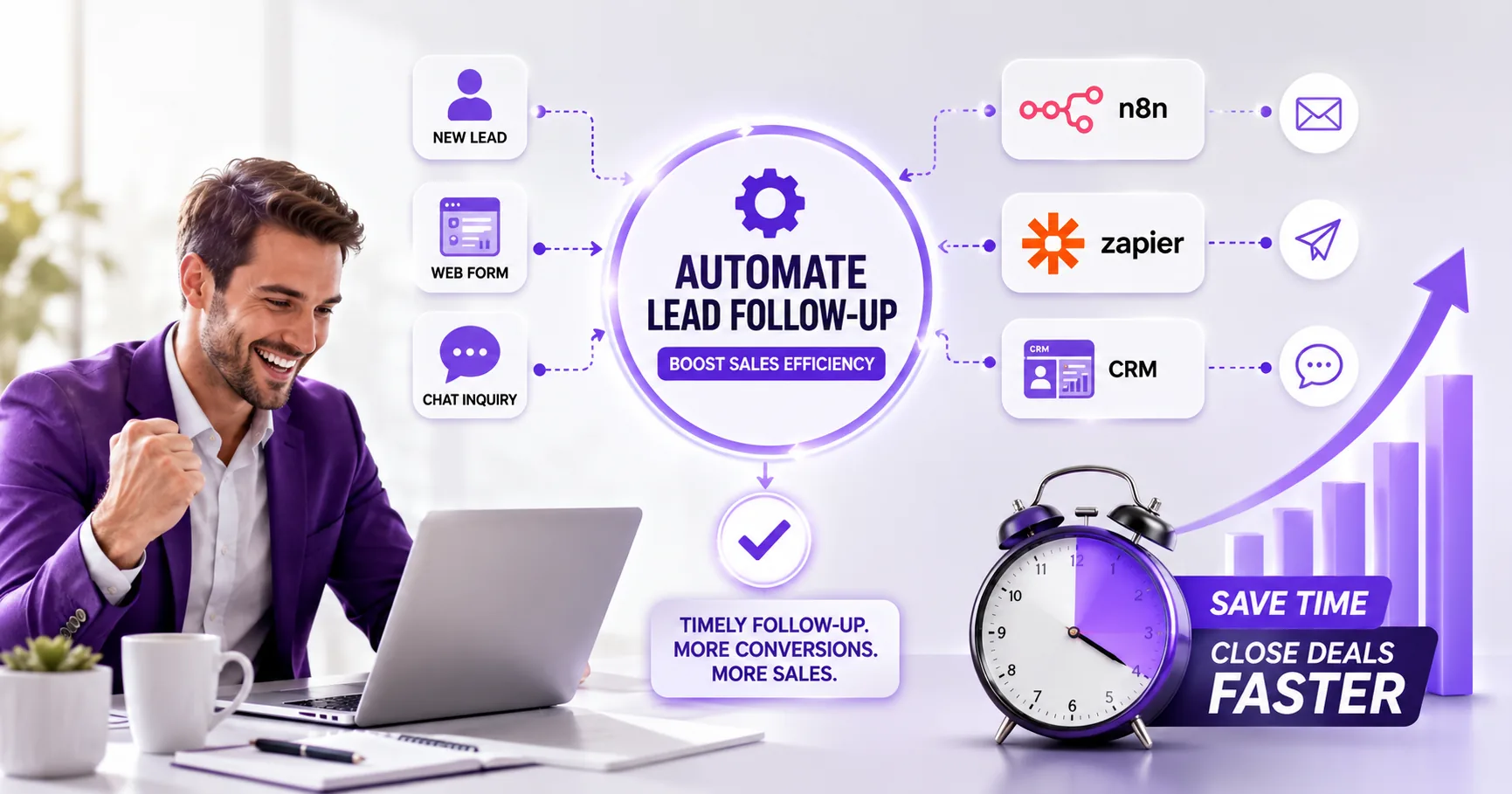
Manual lead follow-up is slow, error-prone, and often leads to missed opportunities. Automating this process saves time, ensures every lead gets a timely response, and helps sales teams focus on closing deals instead of chasing reminders. This article explains how to set up automated lead follow-up workflows using n8n, Zapier, and CRM integrations, with step-by-step guidance and real examples.
If your sales team is still chasing leads manually, you already know the pain: slow follow-up, leads slipping through the cracks, and inconsistent outreach that costs you deals. Automating lead follow-up is one of the fastest ways to save hours every week and make sure every prospect gets the right message at the right time. Instead of relying on spreadsheets, sticky notes, or inbox reminders, you can set up automated workflows that handle the repetitive tasks, so your team can focus on real conversations and closing sales. This guide also covers sales efficiency automation.
In this article, we'll walk through practical ways to automate lead follow-up using tools like n8n, Zapier, and CRM integrations. You'll see how these platforms connect your lead sources (like web forms or ad platforms) with your CRM and communication channels, triggering timely emails, tasks, or even personalized messages without manual effort. We'll cover step-by-step workflow setup, common mistakes to avoid, and real examples of how automation boosts sales efficiency. By the end, you'll know exactly how to get started, no technical background required.
If your sales team is still chasing leads manually, you're likely burning through 10 to 20 hours a week per rep just on reminders, emails, and CRM updates. That time adds up fast, and it often means hot leads cool off before anyone gets back to them. Manual follow-up is not just tedious; it leaves too much room for dropped balls, inconsistent messaging, and missed revenue.

Step-by-Step Automation Workflow Setup
If you want to automate lead follow-up and actually see a boost in sales efficiency, you need a workflow that covers every touchpoint from the moment a lead hits your system. Here's how we set this up for clients using n8n, with pointers for Zapier and HubSpot alternatives.
- Capture the lead: Start with an n8n Webhook node. This node collects leads from your website form, a landing page, or even a CRM webhook (like HubSpot or Salesforce). For example, connect your web form to the n8n webhook URL so every new submission triggers the workflow instantly.
- Enrich lead data: Use an HTTP Request node to pull extra info from external APIs, think Clearbit for company details or OpenAI for quick lead summaries. This step helps your sales team prioritize and personalize outreach. You can also run a quick AI prompt to score or segment the lead.
- Assign or segment the lead: Add a Set or IF node to route leads based on criteria (e.g., region, product interest, deal size). For team assignment, connect to your CRM or a Google Sheet to look up rep availability, or use a simple round-robin logic in n8n.
- Trigger personalized follow-up: Use the Email node (SMTP or Gmail) or an SMS node (like Twilio) to send a tailored message. Pull in dynamic fields (name, company, product) from earlier steps. For more advanced flows, generate the email body with OpenAI and review before sending.
- Schedule reminders or tasks for reps: Add a CRM integration node (e.g., HubSpot, Salesforce) or a task manager node (like Asana or Trello) to create a follow-up task. You can also use n8n's built-in Wait node to delay and check for a response before escalating.
- Log activity back into your CRM: Finish with another CRM integration node to record the email/SMS sent, status updates, and any notes. This keeps your sales pipeline up to date and ensures nothing falls through the cracks.
Zapier alternative: The same workflow can be built in Zapier using its Webhooks, Formatter, Email, and CRM action steps. Zapier is ideal for teams without technical resources, but keep in mind its task-based billing (see Zapier pricing as of July 2026).
HubSpot workflows: HubSpot's built-in automation lets you trigger emails, assign leads, and set tasks directly inside the CRM. For pricing, see official HubSpot pricing (hub-tier, onboarding fees apply).
Testing and monitoring: Always run test leads through your workflow before going live. In n8n, use the built-in execution log and error triggers to catch issues. For Zapier, check the Task History for errors or missed steps. Review CRM logs to confirm activities are recorded as expected.
Tip: Start simple, get the basics working, then layer on enrichment and advanced routing. Overcomplicating early on usually leads to more troubleshooting and less value.
Why Automate Lead Follow-Up?
Automating lead follow-up solves these pain points in a few key ways. First, it cuts response times dramatically. Automated workflows can trigger a personalized email or SMS within minutes of a lead filling out a form, instead of waiting for someone to check their inbox. This speed matters: according to Zapier's blog post on lead response time, businesses that respond to new leads within an hour are far more likely to qualify and convert them than those that wait a day or more.
Second, automation delivers consistent messaging. Every prospect gets the right information at the right time, whether it's a welcome email, a product demo invite, or a follow-up reminder. This consistency builds trust and keeps your brand voice sharp. Tools like n8n and Zapier let you set up these flows without heavy coding, and you can adjust the messaging as your campaigns evolve (see n8n pricing, see Zapier pricing).
Third, automated systems help qualify leads more effectively. By tracking engagement, like email opens or link clicks, you can score leads and route the hottest ones straight to your sales team, while nurturing the rest automatically. This means reps spend more time closing deals and less time chasing dead ends.
Finally, all these benefits add up to higher conversion rates. When leads get prompt, relevant follow-up, they're far more likely to move down the funnel. For SMBs, automating follow-up is one of the lowest-hanging ways to boost sales efficiency without hiring more staff or overhauling your CRM stack.
Core Tools for Lead Follow-Up Automation
Choosing the right automation stack is the first step to making your lead follow-up process faster and more reliable. Here are the core platforms we see most often in modern sales teams, with a quick rundown of what each does best and how they fit into a typical workflow.
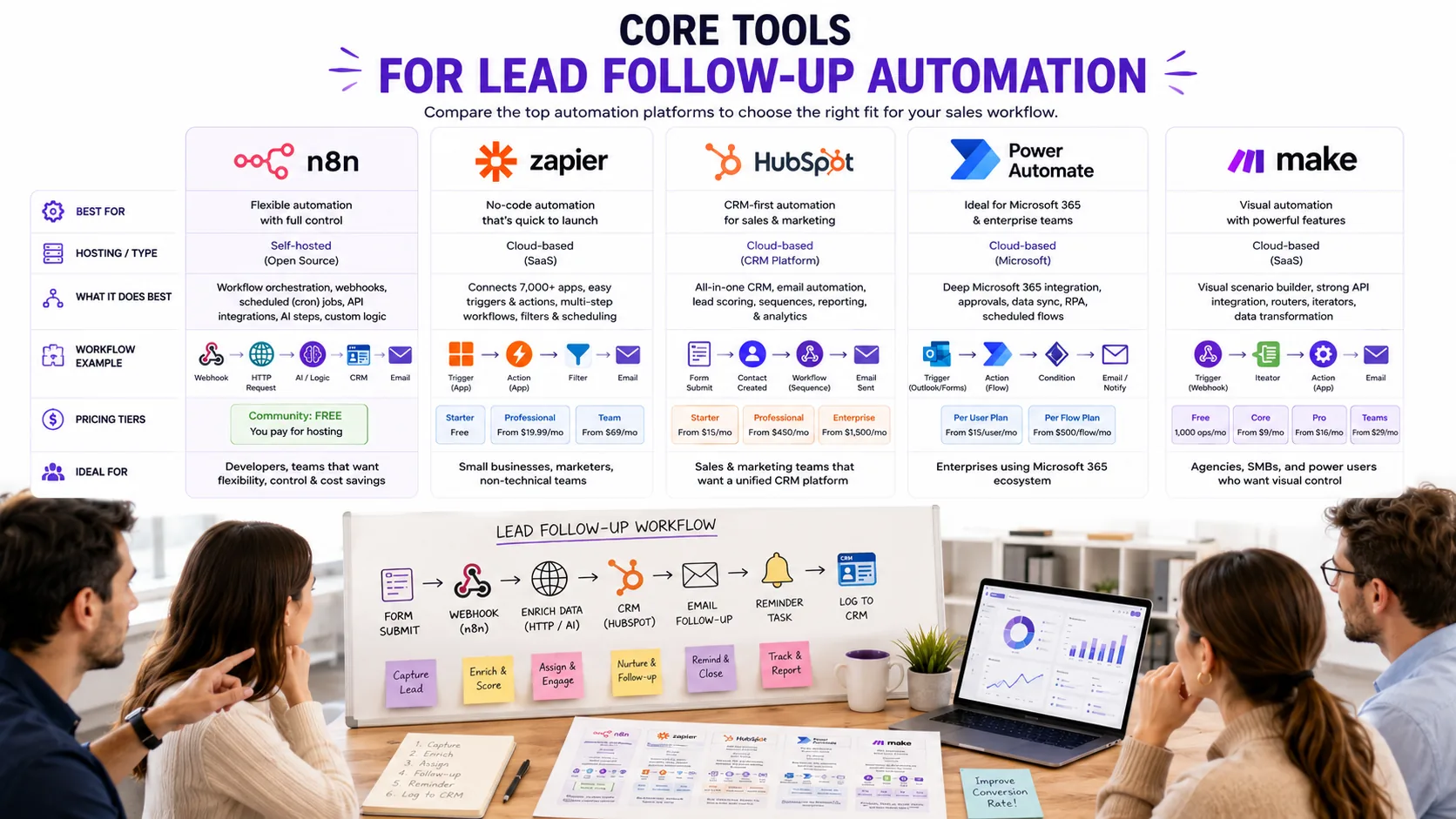
- n8n: This is our go-to for workflow orchestration, especially if you want flexibility and control. n8n is self-hosted (meaning you run it on your own server or cloud), supports webhooks, scheduled (cron) jobs, and can include AI steps for things like lead scoring or smart responses. The Community edition is free, but you need to cover your own hosting. For details, check the official n8n pricing (as of early 2024).
- Zapier: If you want no-code automation and a quick setup, Zapier is a strong choice. It connects thousands of apps and is priced by the number of tasks you run each month. The free plan lets you try basic automations, while Professional and Team tiers enable more features and higher limits. See Zapier pricing for current details (as of early 2024).
- HubSpot CRM: HubSpot is a popular CRM with built-in lead and marketing automation. You can set up follow-up sequences, assign leads, and trigger actions based on lead behavior. Pricing is by hub tier and includes mandatory onboarding fees for Professional and above. For the latest, see HubSpot pricing.
- Microsoft Power Automate: If your team lives in Microsoft 365, Power Automate is worth a look. It offers deep integration with Outlook, Teams, SharePoint, and more. Pricing is per user or per flow. For example, Power Automate Premium is listed at $15 per user/month (paid yearly) as of early 2024. See Power Automate pricing for all options.
- Make: This is a visual automation alternative to Zapier, using a credit-based model. You build workflows by dragging and connecting steps. For plan details, see official Make pricing.
Most teams start with Zapier or HubSpot for speed, then add n8n or Power Automate as their needs get more complex or when they want to keep data in-house. Make is a good fit if you prefer a visual builder and want to control costs with credit-based billing.
Common Mistakes When Automating Lead Follow-Up
Automation can do wonders for sales efficiency, but it is easy to trip up if you are not careful. Here are three mistakes we see SMBs and agencies make when automating lead follow-up, and how to avoid them.
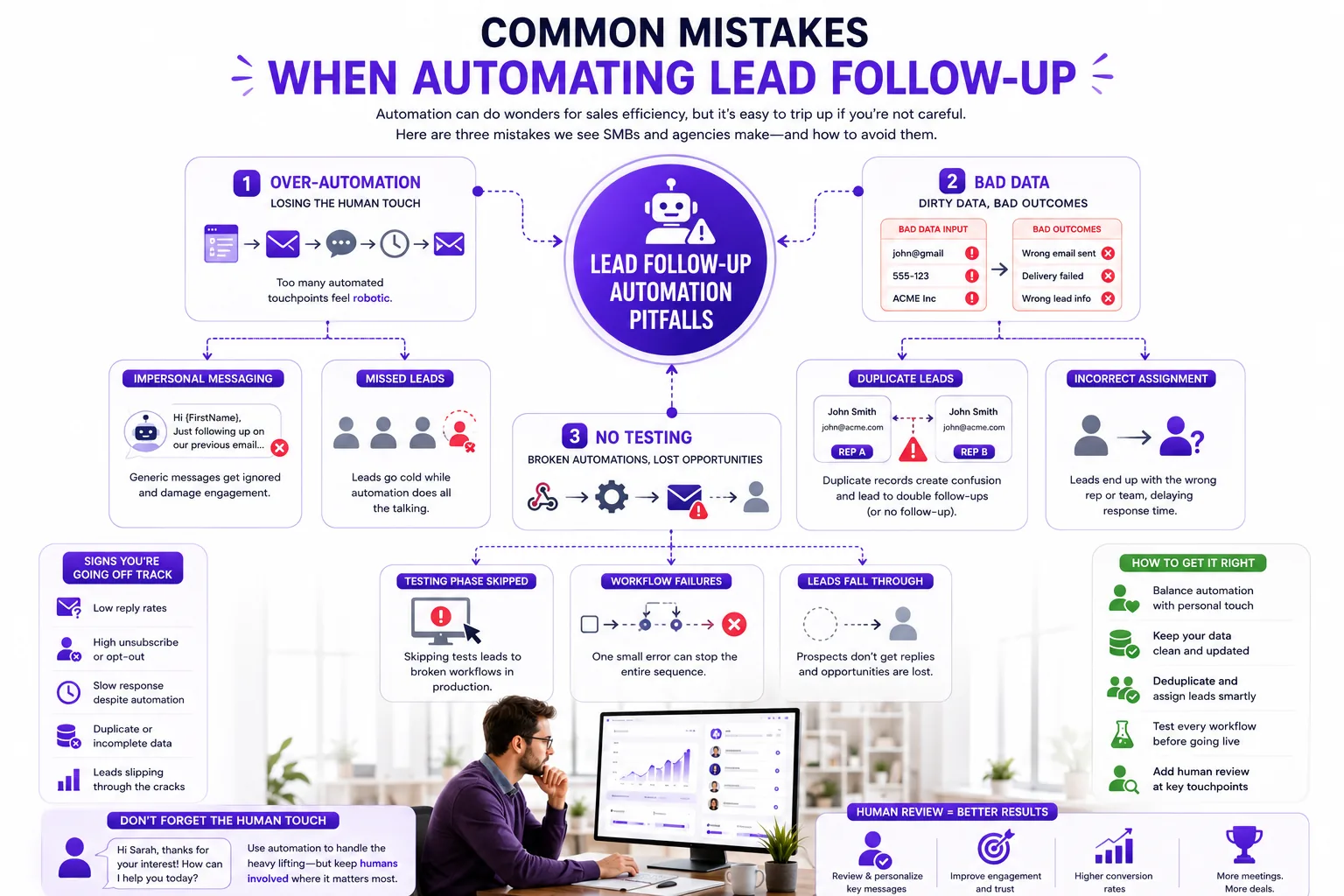
1. Over-automation: Losing the Human Touch
It is tempting to automate every touchpoint, but too much automation can backfire. We have seen agencies set up n8n or Zapier to send a string of generic emails and SMS messages the moment a lead comes in. The result? Leads feel like they are talking to a bot, not a person, and engagement drops fast. In one case, a B2B services client saw their reply rates fall off after switching to a fully automated sequence, until we helped them add a manual review step for high-value leads and personalized the first message. The lesson: use automation to handle routine nudges, but keep space for real human interaction, especially for warm or high-ticket leads.
2. Neglecting Data Hygiene: Bad Data, Bad Follow-Up
Automations are only as good as the data feeding them. If your CRM or lead capture forms have missing fields, duplicate entries, or outdated contact info, your workflow will misfire. We have seen SMBs accidentally assign the same lead to two reps, or send follow-ups to the wrong email address, all because of unchecked data. One marketing agency ran into trouble when their Zapier flow pulled in leads from a web form with inconsistent field names, causing leads to get lost or misrouted. Make it a habit to clean your data and map fields carefully before you turn on any automation.
3. Skipping Testing: Broken Flows and Missed Leads
It is easy to get excited and flip the switch on a new workflow without proper testing. But skipping this step can mean missed leads or embarrassing errors. We have worked with teams who launched a new n8n follow-up flow, only to find out a week later that a typo in the email node broke the entire sequence. Always run test leads through your automation, check every branch, and monitor the first few days closely. Even with no-code tools like Zapier, a single misconfigured filter can stop follow-ups cold.
Tip: Balance automation with a human touch, keep your data clean, and never skip the testing phase. Ongoing monitoring is not optional, set up alerts or dashboards so you catch issues before they cost you sales.
Illustrative Case Study: Lead Follow-Up Automation
Before
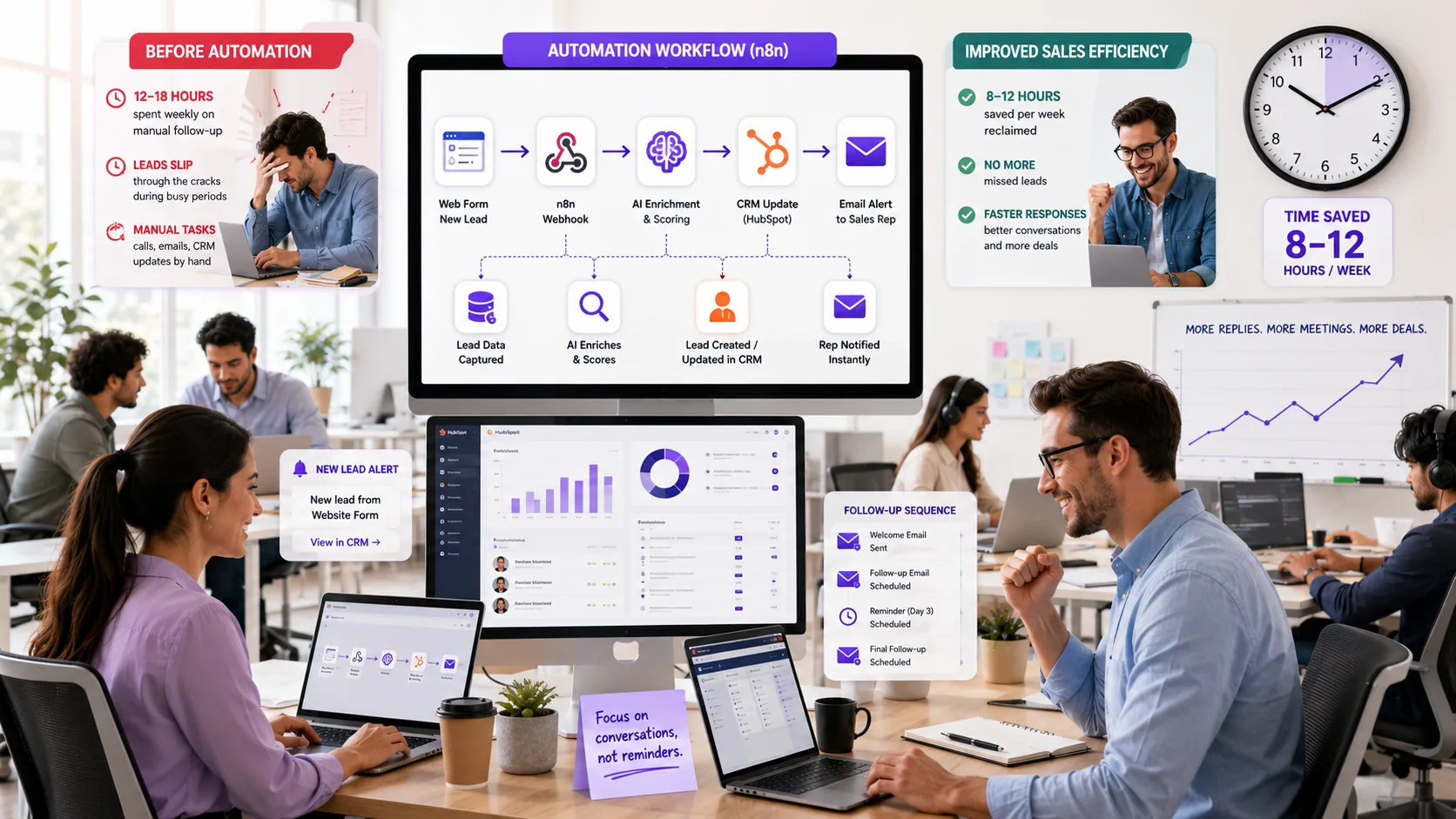
Let's look at how a typical sales team can reclaim lost hours and missed opportunities with lead follow-up automation. Before automation, a 10-person sales team was spending 12 to 18 hours every week just on manual follow-up tasks. During peak campaign periods, leads would slip through the cracks, especially when reps were juggling calls, emails, and CRM updates by hand.
Solution
The solution started with an n8n workflow that connected their web form (where new leads landed) directly to their HubSpot CRM. Each new lead triggered an automated process:
- The workflow enriched the lead data using an AI service to fill in missing company info and social profiles.
- It assigned leads to reps based on availability and territory rules set in the CRM.
- Next, the workflow sent out a personalized email sequence tailored to the lead's interests, with built-in delays and branching logic for replies or non-responses.
- If a lead did not reply within 24 hours, the system scheduled a follow-up reminder for the assigned rep and logged all activity back into HubSpot for full visibility.
The automation stack was built with n8n (see n8n pricing), HubSpot CRM (see official HubSpot pricing), and off-the-shelf AI enrichment APIs. For teams without in-house technical resources, Zapier (Zapier pricing) offers a no-code alternative, though with less flexibility for branching and enrichment.
Results
After rollout, sales reps reported regaining 8 to 12 hours per week that used to be lost to repetitive admin. Lead response times improved noticeably, and the team saw a clear uptick in qualified lead conversions, especially during busy periods when manual follow-up used to lag.
Tip: Start by automating just the lead capture and first follow-up. Once that's working smoothly, layer on enrichment, reminders, and more advanced branching logic.
Rollout and Adoption Roadmap
If you want your lead follow-up automation to actually improve sales efficiency, you need a structured rollout plan, not just a technical setup. Here's a practical roadmap we use with clients to make sure automations stick and deliver results:
- Define clear goals and KPIs: Establish what success looks like, such as reduced response times or increased lead conversion rates. Include specific metrics like target response time under 30 minutes and a 10% increase in qualified leads within three months.
- Assign ownership: Designate a team member or automation champion responsible for maintaining and updating workflows. This person should also coordinate between sales, marketing, and IT teams to ensure alignment.
- Develop training materials: Create documentation, video tutorials, and conduct live training sessions to ensure all sales reps understand how the automation works, how to interact with it, and how to troubleshoot common issues.
- Pilot rollout: Start with a small group of users to gather feedback and identify any issues before full deployment. Use this phase to test different messaging sequences and timing to optimize engagement.
- Full deployment: Roll out automation to the entire sales team, ensuring support channels are available for questions or troubleshooting. Schedule follow-up check-ins at 1 week, 1 month, and 3 months post-launch to address concerns.
- Monitor and iterate: Regularly review performance metrics and user feedback to refine workflows and address any bottlenecks. Use analytics dashboards to track open rates, response times, and conversion rates.
- Establish feedback loops: Encourage sales reps to report challenges or suggestions through regular surveys or dedicated communication channels to continuously improve the system.
- Plan for scalability: As your lead volume grows, prepare to adjust automation rules, add new touchpoints, or integrate additional tools to maintain efficiency.
Tip: Good documentation and clear ownership are what keep automations running long-term. Don't skip this step, otherwise, you'll end up with a black box nobody wants to touch.
Frequently Asked Questions
What is the best tool for SMB lead follow-up automation?
There is no single best tool for every SMB, but n8n, Zapier, and HubSpot are the most common starting points. n8n is popular with teams that want flexibility and control, especially if you have someone comfortable with basic workflow logic or want to self-host. Zapier is the go-to for non-technical teams who want a no-code, plug-and-play solution. HubSpot offers built-in lead follow-up automation if you already use their CRM. For visual drag-and-drop, Make is another option. Each tool has a different pricing model and integration ecosystem, so check their official sites for the latest details.
How do I start automating lead follow-up without coding skills?
Zapier and Make are designed for non-coders. You can set up basic automations by connecting your lead source (like a web form or CRM) to your email or messaging tool using prebuilt templates. Most platforms offer step-by-step wizards and plenty of video guides. HubSpot also lets you build simple workflows with a visual editor. If you get stuck, many agencies or freelancers can help set up your first flows for a fixed fee.
Can automation replace sales reps in lead follow-up?
Automation can handle the repetitive parts: sending timely emails, reminders, and logging activity in your CRM. But it cannot fully replace the human touch needed for relationship-building, negotiation, or handling objections. The best results come from blending automation (for speed and consistency) with personal outreach at key moments in the sales process.
How can I ensure personalized follow-up messages at scale?
Use dynamic fields (like first name, company, or lead source) in your automated messages. Most tools let you pull this data from your CRM or web form. For more advanced personalization, you can add conditional logic (e.g., different messages for different lead types) or use AI tools to generate custom snippets. Always review your templates and test with real data to avoid embarrassing mistakes.
What are common pitfalls to avoid when automating lead follow-up?
Common mistakes include over-automating (which makes your outreach feel robotic), ignoring data quality (leading to wrong or duplicate messages), and failing to test workflows before going live. Also, watch out for sending too many emails or messages, which can annoy leads and hurt your sender reputation. Assign someone to monitor the automations and handle exceptions manually when needed.
After building dozens of lead follow-up automations for clients, a few patterns stand out. First, set clear goals before you touch any tool. Are you aiming to respond to every inbound lead within 10 minutes? Want to nurture cold leads with a drip sequence? Write these targets down. They guide every decision, from tool selection to workflow design.
Choose tools that match your team's technical comfort and budget. If your crew is non-technical, Zapier is a strong starting point, its interface is approachable, and you can get going on the free plan (as of early 2024, 100 tasks/month). For more flexibility and lower long-term costs, n8n is our go-to. The self-hosted Community edition is free (you just pay for hosting), and the SaaS option is available at n8n.io. If you're already deep into HubSpot or Microsoft 365, their built-in automation is worth a look, see HubSpot pricing and Power Automate pricing for current tiers.
Start simple. It's tempting to automate every possible touchpoint, but complex branching and too many triggers can make maintenance a nightmare. Begin with a single trigger (like a new lead in your CRM) and a straightforward sequence: log the lead, send a templated email, and set a reminder for manual follow-up. Expand only after this core loop works reliably.
Monitor your data quality. Automations are only as good as your inputs. We often see issues where missing email addresses, duplicate records, or inconsistent lead sources break downstream steps. Set up basic checks and alerts for missing or malformed data early on.
Don't forget the human touch. Automation should tee up your sales team, not replace them. Use automation to handle repetitive tasks and reminders, but schedule manual reviews and personal outreach for high-value leads. A quick phone call or personalized note still makes a difference.
Finally, schedule regular reviews. Every quarter, audit your workflows: Are leads slipping through? Are emails landing in spam? Is your CRM data still clean? Small tweaks can keep your automation running smoothly as your business evolves.
Tip: If you want a tailored automation build or team training, contact Prompt Gurru. We can help you scope, build, and maintain lead follow-up workflows that fit your stack and sales process.
About the author
Prompt Gurru Team brings over 10 years of hands-on experience in AI automation, n8n workflow builds, OpenAI API integrations, and CRM automation for startups and SMBs. Our team has shipped more than 50 projects across B2B services, marketing agencies, e-commerce, and SaaS, with a focus on practical, scalable solutions that actually fit your sales and ops teams.
We specialize in n8n, Zapier, and custom CRM integrations, often wiring in AI chatbots for lead qualification and follow-up. Our work covers everything from simple lead routing to advanced multi-step automations with OpenAI and custom dashboards. If you see custom build ranges in our articles, those reflect illustrative US market estimates for scoped n8n/OpenAI/CRM projects, typically including discovery, workflow build, testing, documentation, and team training. Actual costs vary by stack complexity and requirements.
Want to see how automation can boost your sales efficiency? Visit our website or contact us for a discovery call. We work globally, with clients in 25+ countries, and are happy to advise on your automation roadmap or build a custom solution for your team.
Additional Resources
If you want to go further with sales automation or need help tailoring workflows to your business, check out these resources from Prompt Gurru and our partners:
- AI automation services to Explore how we build n8n, Zapier, and OpenAI-powered workflows for SMBs.
- Contact Prompt Gurru to Reach out with questions or to discuss your automation needs.
- Book a free discovery call to Get practical advice on your stack, project scope, or automation roadmap.
- More blog articles to Read in-depth guides like How to automate lead follow-up emails with n8n and your CRM, Workflow Automation Software: How It Works and What to Buy in 2026, and How much does custom workflow automation cost for a small business?
- Facebook Ad Optimizer to Automate ad performance tracking and lead capture from Facebook campaigns.
- ReviewPilot to Streamline review requests and follow-up for improved reputation management.
- FlutterInit to Fast-start your mobile app project with our Flutter boilerplate, ideal for custom lead management tools.
These links cover everything from hands-on automation builds to specialized tools that complement your lead follow-up process. If you are ready to automate or want to see real examples, start with a discovery call or browse our detailed blog guides.
Ready to automate your business?
We build n8n workflows, AI pipelines, Flutter apps, and custom software for startups and SMEs - like the system that powers this blog.
Book a free discovery call