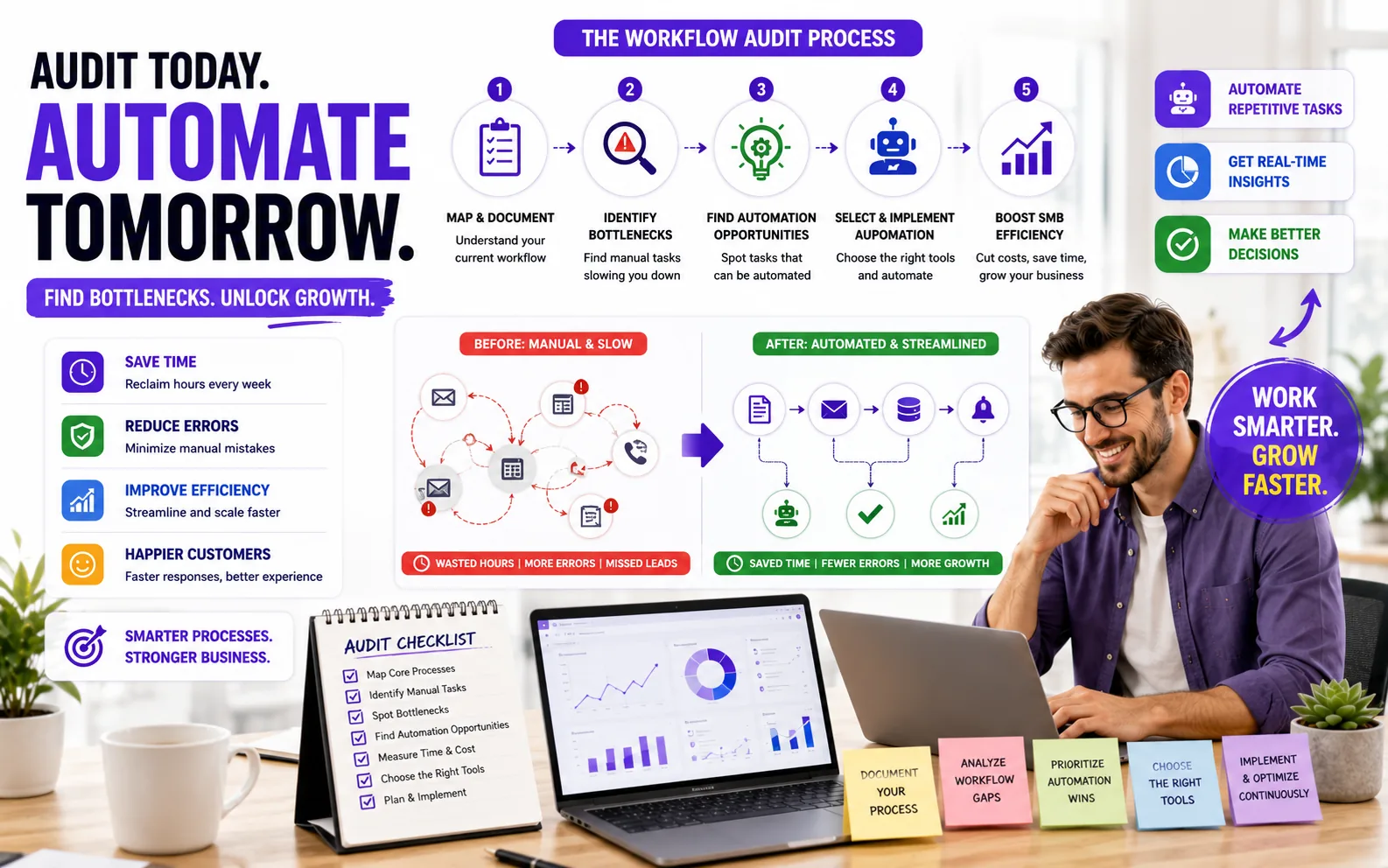
Discover how to perform a detailed workflow audit specifically designed for small and medium businesses. This guide helps you identify manual bottlenecks and automation opportunities to improve efficiency and reduce repetitive tasks. Learn practical steps to document processes, analyze workflows, and select the right automation tools for your SMB.
If you run a small or medium business, you probably know the pain of manual processes that eat up your team's time. A workflow audit is a focused review of how work actually gets done in your business, with the goal of spotting bottlenecks, repetitive tasks, and handoffs that could be automated. The real value? You get a clear map of where your team is losing hours to manual steps, and a prioritized list of automation opportunities that can boost efficiency and cut down on errors. This guide also covers automation opportunities for SMBs and workflow analysis small business.
This guide walks you through the exact steps we use with SMB clients to audit workflows and uncover automation potential. We'll cover how to document your current processes, what to look for when identifying manual pain points, and how to evaluate which tasks are ready for automation. You'll also see which tools are worth considering, with links to up-to-date pricing for platforms like n8n, Zapier, Make, HubSpot, and Microsoft Power Automate. By the end, you'll know how to run a workflow audit that reveals real, actionable automation wins for your business.
If you skip the audit and jump straight into automation, you risk making your problems worse. Many SMBs run into issues like manual data entry, scattered spreadsheets, and teams using a patchwork of tools that barely talk to each other. Automating these broken or inconsistent processes just locks in inefficiency, and sometimes creates new headaches when errors get propagated faster.
Take manual data entry as an example. It eats up hours and is prone to mistakes, but if the underlying process is unclear or involves double-handling, automating it without fixing the root cause can just speed up the mess. Fragmented tools are another common pain point. If your sales team uses one CRM, support uses another, and marketing has its own list, automating across these silos without first mapping the workflow can lead to missed handoffs and data loss.
A workflow audit helps you see the full picture. By documenting each step, you can spot where information gets stuck, where tasks are duplicated, and which steps are truly necessary. This makes it much easier to prioritize what to automate first, usually the repetitive, high-volume tasks that drain your team's time. It also reveals hidden inefficiencies, like approvals that sit in someone's inbox for days or reports that no one actually reads.
Tip: Don't just automate what feels annoying, focus on steps that are both time-consuming and clearly defined. If a process is inconsistent or changes every week, fix the process before you automate it.
In short, a workflow audit is your insurance policy against automating the wrong things. It gives you a clear roadmap for where automation will have the biggest impact, and helps you avoid costly rework down the line.
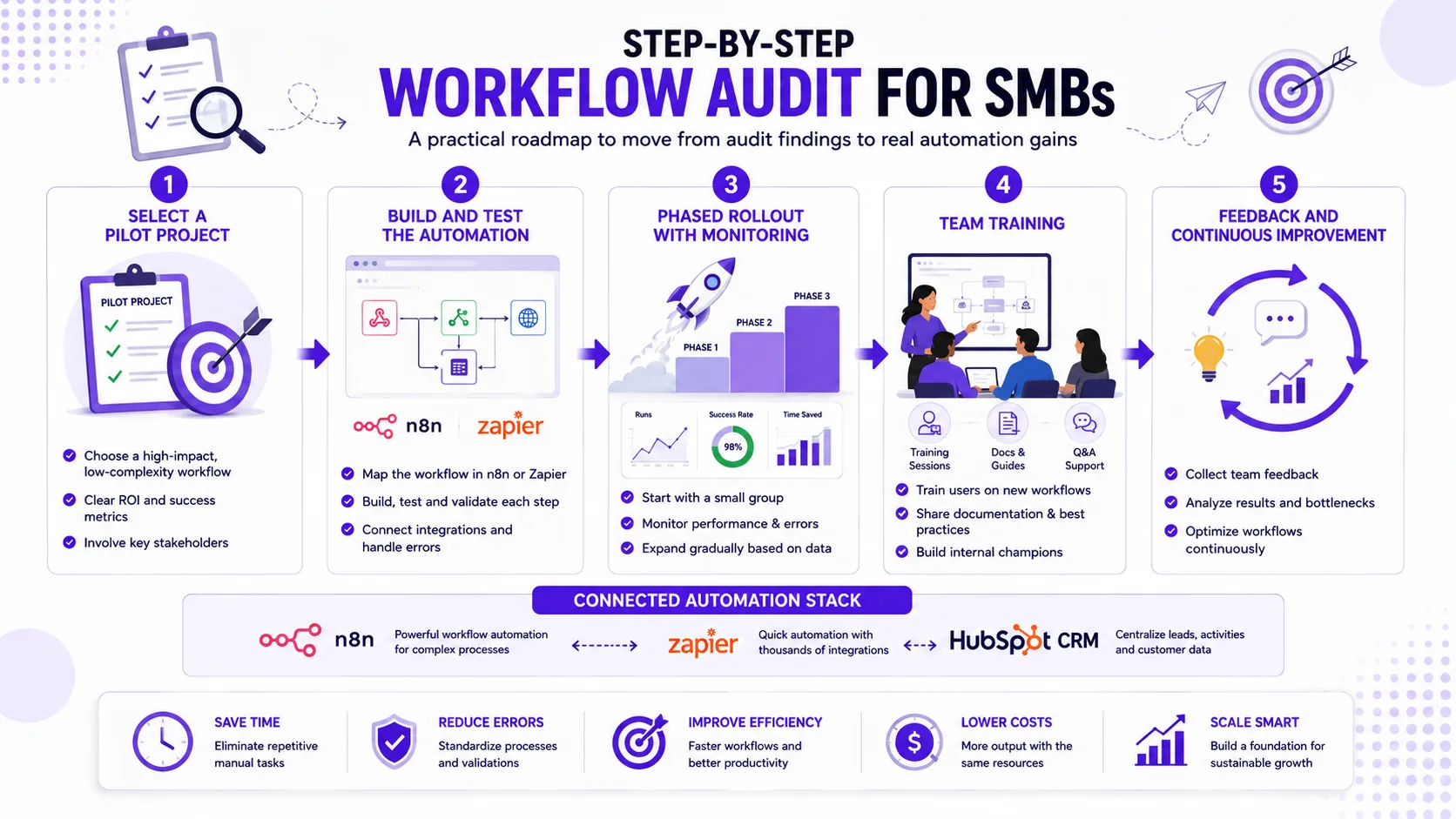
Step-by-Step Workflow Audit for SMBs
Ready to spot where automation will actually help your business? Here is a practical, repeatable workflow audit process we use with SMB clients. Each step is designed to surface manual work, bottlenecks, and clear automation wins, without getting lost in theory.
- Form Submit
- n8n
- OpenAI
- HubSpot
- Follow-up Email
Workflow Audit Steps
- Map existing workflows visually. Start by diagramming your core processes. Tools like Lucidchart or Miro work well for this, but even a whiteboard photo is better than nothing. Capture every step, handoff, and tool involved. For example, outline your lead intake, order processing, or invoice approval flows. The goal: make invisible work visible.
- Collect data on task frequency and time spent. Use time-tracking apps like Toggl or Harvest, or even a simple spreadsheet, to log how often each task occurs and how long it takes. If your team already uses project management tools, export activity logs for a week or two. This data helps you quantify where the most manual effort is going.
- Interview team members for pain points and manual steps. Sit down with the people actually doing the work. Ask: What slows you down? Where do things get stuck? Which tasks feel repetitive or error-prone? Document specific examples, like retyping customer info into multiple systems or chasing approvals by email.
- Identify repetitive, rule-based tasks suitable for automation. Review your mapped workflows and interview notes. Highlight steps that follow clear rules, happen often, and do not require much judgment. Examples: copying data between apps, sending status updates, or generating standard reports. Flag these as automation candidates.
- Prioritize workflows by impact and ease of automation. Not every pain point is worth automating first. Use a simple grid: high-impact/easy-to-automate tasks go to the top of your list. Consider both potential time savings and technical complexity. For instance, syncing leads from a web form to your CRM is usually easier than automating a custom quoting process.
- Document findings in a clear report or spreadsheet. Summarize your mapped workflows, pain points, and automation opportunities. Include estimated time spent, who is involved, and your priority ranking. This document is your blueprint for tool selection and implementation. Share it with decision-makers and your automation partner.
Tip: For each workflow, note which apps are involved (e.g., Gmail, QuickBooks, HubSpot) and whether they offer APIs or Zapier/Make integrations. This will save you hours when you start evaluating automation tools.
Common Pitfalls to Avoid
- Only auditing visible workflows: Many teams focus on the obvious, documented processes, like invoicing or order fulfillment, while missing informal or cross-team workflows. For example, the way customer complaints are escalated via Slack or how sales hand off leads to onboarding might never make it into a flowchart, but these are often ripe for automation. Ask team members about "how things really get done" to uncover hidden routines.
- Rushing to automate without validation: It's tempting to automate a process as soon as you spot repetitive steps. But if you skip validating the data quality or don't get feedback from the people actually doing the work, you risk automating broken processes. For instance, automating a lead assignment flow in Zapier or n8n before confirming that your CRM fields are consistently filled will just push errors downstream. Always pilot automations with real data and involve end users before rolling out widely.
- Ignoring scalability and maintenance: Not every workflow is a good automation candidate. Some processes change frequently, involve lots of exceptions, or require judgment calls. Automating these can create headaches later, especially if you use a tool with rigid logic or limited support for updates. When evaluating tools like n8n, Zapier, or Power Automate, consider how easy it will be to update your automations as your business grows or your stack changes.
By following these steps, you will have a concrete list of automation-ready workflows, a sense of where your team's time is actually going, and a clear path to start automating with tools like n8n, Zapier, Make, or Microsoft Power Automate.
Frequently Asked Questions About Workflow Audits and Automation for SMBs
How long does a typical workflow audit take for an SMB?
For most small and medium businesses, a focused workflow audit takes between 1 and 3 weeks from kickoff to actionable findings. The actual time depends on the number of processes you want to review, how available your team is for interviews or workshops, and whether you already have process documentation. For a single department or a handful of workflows, you can often get meaningful results in under 20 hours of combined effort.
What tools do SMBs need to conduct a workflow audit?
You do not need expensive software to start. Most teams use a mix of spreadsheets, process mapping tools (like Lucidchart or Miro), and basic time-tracking apps. If you want to jump straight into automation, platforms like n8n, Zapier, or Make (credit-based; see their pricing pages) can help you prototype and test automations after you map your workflows. For CRM-centric processes, check HubSpot pricing for automation features bundled with their CRM.
Note: Pricing for these tools may vary based on region, subscription level, and usage. Always consult the official pricing pages for the most current and applicable information.
How should we involve our team in the audit?
Involve the people who actually do the work. Ask them to walk through their daily steps, highlight pain points, and estimate how much time is spent on each task. Group workshops or one-on-one interviews both work. Make it clear this is about making their jobs easier, not replacing them. The best automation ideas often come from frontline staff who know where the bottlenecks are.
What are signs that a workflow is ready for automation?
Look for processes with lots of manual, repetitive steps, frequent data entry, or tasks that follow clear rules. If your team is copy-pasting between apps, sending the same emails over and over, or updating spreadsheets daily, those are strong candidates. Also, if errors or delays often happen at the same step, automation can help reduce mistakes and speed things up.
How do we measure the success of workflow automation?
Track the time saved on manual tasks, error rates before and after automation, and how quickly work moves through the process. For example, if automating lead follow-up cuts response time in half, that is a clear win. Set a baseline before you start, then check results after rollout. If you use tools like n8n or Power Automate, you can often pull logs or analytics to measure impact directly.
Practitioner Perspective: Tips from Automation Experts
When you dig into a workflow audit for SMB automation, it's easy to get distracted by shiny tools or the urge to automate everything at once. The best results come from balancing quick wins with a long-term view. Start by documenting every step of your current processes, yes, even the messy manual workarounds. Use simple flowcharts or spreadsheets to capture who does what, when, and with which tools. This documentation is your foundation for spotting repetitive tasks and bottlenecks that are ripe for automation.
- Lead Form
- n8n Trigger
- OpenAI Classify
- HubSpot Deal
- Slack Notify
For SMBs with complex or evolving needs, we often recommend starting with flexible platforms like n8n. Unlike rigid no-code tools, n8n lets you build multi-step automations, connect to almost any app, and adjust logic as your business grows. If your team is less technical or needs fast, simple integrations, check out Zapier or Make. Be aware of their pricing models and limits before committing.
One common pitfall is over-automation: automating rare exceptions or processes that change every month. Focus on high-volume, stable tasks first. And remember, automation is not set-and-forget. Plan for ongoing monitoring, use built-in analytics or simple checklists to spot failures and tweak as needed. Even the best workflows need regular reviews as your business evolves.
Pro tip: Document why you automated each step and who owns it. This makes troubleshooting and future audits much easier.
If you need help mapping your workflows or choosing the right automation stack, browse our articles or book a discovery call with the Prompt Gurru team. We help SMBs design, build, and maintain automations that actually stick.
Prompt Gurru Team is an AI automation and custom software studio with over 10 years of hands-on experience helping startups and SMBs streamline operations. Our expertise covers n8n workflow automation, OpenAI API integrations, CRM and marketing automation, and building custom web and mobile apps. We have shipped 50+ projects for clients in B2B services, marketing agencies, e-commerce, and SaaS.
When it comes to workflow automation, we specialize in practical solutions: from mapping out manual processes to wiring up tools like n8n, HubSpot, and Zapier. Our articles reference illustrative US custom build ranges based on real project scopes for n8n, OpenAI, and CRM integrations, including discovery, build, testing, documentation, and team training. If you want to see what automation could do for your business, contact us or book a free discovery call to discuss your workflow challenges.
If you want to go deeper on workflow audits, automation tools, or CRM integration for SMBs, check out these internal resources from Prompt Gurru:
- How to audit your business for automation opportunities in one afternoon: A practical walkthrough for SMBs that want a fast, actionable audit process.
- Workflow Automation Software: How It Works and What to Buy in 2026: Tool comparisons, pricing, and selection tips for SMBs.
- How much does custom workflow automation cost for a small business?: Realistic cost breakdowns for custom and off-the-shelf solutions.
- AI Automation Tools for Small Business 2026: Practical Guide to Smarter Operations: Covers AI-driven automation options and use cases.
- Best CRM for Small Business in 2026 - Slack: CRM selection and integration advice for growing teams.
- AI automation services: See how Prompt Gurru helps SMBs map, automate, and optimize business processes.
- Book a free discovery call: Get tailored advice on workflow audits and automation opportunities for your business.
For more articles and implementation guides, visit the Prompt Gurru blog.
About the author
Prompt Gurru Team — AI automation and custom software studio. Prompt Gurru is a software studio specializing in AI automation, custom web applications, and mobile apps. We partner with startups and SMEs worldwide to design, build, and scale digital products.
Our shipped work includes Max Invoice, Max HR, Mindway, holo, and Wahy Institute — live on Google Play, the App Store, and the web. Trusted by founders at Max ERP, Mindway, Zeebrix, and Wahy Institute.
10+ years of experience. Based in Pakistan, serving clients in 25+ countries. 10+ years experience. Industries served include B2B services, marketing agencies, e-commerce, SaaS startups.
Custom build ranges in our articles are illustrative US market estimates for scoped n8n/OpenAI/CRM work; request a discovery call for a quote on your stack.
Learn more at promptgurru.com.
Ready to automate your business?
We build n8n workflows, AI pipelines, Flutter apps, and custom software for startups and SMEs - like the system that powers this blog.
Book a free discovery call