
Discover how real estate businesses can automate lead capture and qualification using AI chatbots integrated with CRM systems. This guide compares top tools, outlines pricing and total cost of ownership, and provides an illustrative case study to help SMB owners plan their automation projects.
Manual lead capture and follow-up are two of the biggest bottlenecks for real estate agencies trying to scale their sales pipeline. Prospects expect instant responses, but most small and mid-sized teams are still copying data from website forms into their CRM, then scrambling to assign leads and send follow-ups. This is where AI chatbots and workflow automation can make a measurable difference. By combining AI-powered chatbots with direct CRM sync, real estate businesses can qualify leads instantly, route them to the right agent, and trigger personalized follow-up , all without manual data entry or missed opportunities. This guide also covers AI chatbots for real estate and CRM sync for real estate leads.
In this guide, we break down the key components of real estate lead automation: AI chatbots for lead capture and qualification, CRM integration for data sync and follow-up, and workflow automation platforms that tie it all together. We'll compare the top tools, outline pricing and total cost of ownership, and walk through an illustrative case study. If you're a broker, sales manager, or operations lead looking to automate your lead pipeline, you'll find actionable advice and clear next steps here. For more on related topics, see our other automation articles or AI automation services.
Common mistakes when automating real estate lead capture
Automating lead capture with AI chatbots and CRM sync is powerful, but we see recurring mistakes that can stall or even backfire on real estate teams. Here are three of the most common issues , and how to avoid them.

- Platform choice: n8n, Zapier, Make, HubSpot, or Power Automate bill differently.
- Workflow complexity: Branching logic and integrations drive build hours.
- Task or operation volume: SaaS plans charge per run; model expected monthly volume.
- Custom UI or apps: Portals and mobile clients add scope beyond orchestration alone.
- Support and maintenance: Budget for hosting, API usage, and an annual retainer.
- Overloading chatbots with too many questions: It's tempting to ask every qualifying question up front, but long or complex chatbot flows cause drop-offs. We recommend starting with 3 to 5 essential questions (name, contact, property interest, budget) and collecting more details later in the sales process.
- Poor CRM data mapping: If your chatbot fields don't map cleanly to your CRM's custom properties, you risk losing leads or creating duplicates. Always review your CRM schema and test with sample data before going live. In our n8n builds, we use explicit property mapping and error handling to catch sync issues early.
- Ignoring compliance and privacy: Real estate lead data is sensitive. Failing to handle consent, opt-ins, or data retention rules can create legal headaches. Make sure your chatbot scripts include consent language and that your automation platform supports GDPR or local compliance needs.
For more on chatbot design, see our article on AI chatbot for lead qualification.
Comparison of tools for AI chatbot and CRM sync in real estate
Choosing the right automation stack for real estate lead capture means balancing flexibility, ease of use, and integration depth. Here is a breakdown of the top platforms we see in client projects, with their strengths and tradeoffs for AI chatbot and CRM sync.

| Tool | Deployment | Best for | Ease of use | Execution limits | AI support | Pricing summary | Key limitation |
|---|---|---|---|---|---|---|---|
| n8n | Self-hosted, Cloud | Custom workflows, unlimited logic | Moderate (tech skills needed) | Unlimited (self-hosted) | Native OpenAI, flexible | Community edition free (hosting extra) (see pricing) | Requires setup and hosting |
| Zapier | Cloud | No-code, non-technical teams | Very easy | Task-based billing | AI steps, GPT, integrations | Free tier, paid from $0/mo (see pricing) | Task limits, less logic depth |
| Make | Cloud | Visual automation, branching | Easy-moderate | Credit/operation-based | AI modules, OpenAI | See official Make pricing | Complexity for large flows |
| HubSpot CRM | Cloud | CRM + marketing automation | Easy | Contact/feature tiers | AI chatbot, workflows | See official HubSpot pricing | Onboarding fees, tier jumps |
| Microsoft Power Automate | Cloud, Desktop | Microsoft 365 shops | Moderate | Per-user/flow billing | AI Builder, connectors | From $15/user/mo (see pricing) | Best with MS stack |
Each platform has a sweet spot. For flexible, API-driven workflows and custom chatbot logic, n8n is our go-to (especially for teams with in-house tech or a partner like Prompt Gurru). Zapier and Make are great for quick wins and non-technical teams. HubSpot is a strong choice if you want CRM, marketing automation, and chatbot tools in one. Microsoft Power Automate is best for agencies already deep in the Microsoft ecosystem. For more on workflow automation, see our automation tools guide.
Pricing overview and total cost of ownership for real estate lead automation
Budgeting for real estate lead automation means looking beyond just the SaaS subscription. You'll need to factor in platform fees, hosting (if self-hosted), API usage, and custom build costs if you want a tailored solution. Here is a breakdown by platform and build type as of June 2026.

n8n
- Community edition is free to use (self-hosted); you pay for cloud hosting (from $5 to $50/month for typical small teams) and any premium modules.
- n8n Cloud offers managed hosting; see n8n pricing for current tiers.
- Custom workflow build (US market): $10,000 to $40,000 for end-to-end chatbot + CRM sync, including discovery, build, testing, and team training (illustrative Prompt Gurru range).
- Ongoing: OpenAI API usage (typically $20 to $100/month for moderate chatbot traffic), minor workflow tweaks, and hosting.
Zapier
- Free forever tier (100 tasks/month); paid plans start at $0/month as of June 2026. See Zapier pricing for current details.
- Task-based billing: costs scale with lead volume and workflow complexity.
- Custom build: $8,000 to $25,000 (US illustrative) for full chatbot + CRM sync setup, including discovery, build, and training.
- Ongoing: Zapier subscription, OpenAI or other AI API usage, and support.
Make
- Credit/operation-based plans; see official Make pricing for up-to-date tiers.
- Custom build: $8,000 to $25,000 (US illustrative) for chatbot + CRM sync, depending on branching and integrations.
- Ongoing: Make subscription, AI API usage, and maintenance.
HubSpot CRM
- Hub-tier pricing per month; Professional and above include mandatory onboarding fees. See official HubSpot pricing for details.
- Custom build: $12,000 to $30,000 (US illustrative) for advanced chatbot, CRM sync, and workflow automations.
- Ongoing: HubSpot subscription, chatbot/AI modules, and support.
Microsoft Power Automate
- From $15/user/month (paid yearly) as of June 2026. See Power Automate pricing for current tiers.
- Custom build: $10,000 to $35,000 (US illustrative) for chatbot + CRM sync with Microsoft stack.
- Ongoing: Power Automate subscription, AI Builder usage, and support.
Total cost of ownership: For most SMB real estate teams, expect SaaS and API costs to run $100 to $500/month, with custom build projects ranging from $8,000 to $40,000 depending on integrations, logic, and training. These ranges are illustrative US market bands for scoped n8n/OpenAI/CRM work, including discovery, build, testing, documentation, and team training. For a tailored quote, contact Prompt Gurru or book a discovery call.
Pricing disclaimer: All SaaS and build figures are indicative as of June 2026 and may vary by scope, vendor, and region. Always check the official pricing pages for n8n, Zapier, Make, HubSpot, and Power Automate for the latest details.
Illustrative case study: Real estate agency automates lead capture and qualification (illustrative example)
In this illustrative example, a mid-sized real estate agency wanted to improve lead response times and conversion rates by automating their website lead capture and CRM sync.
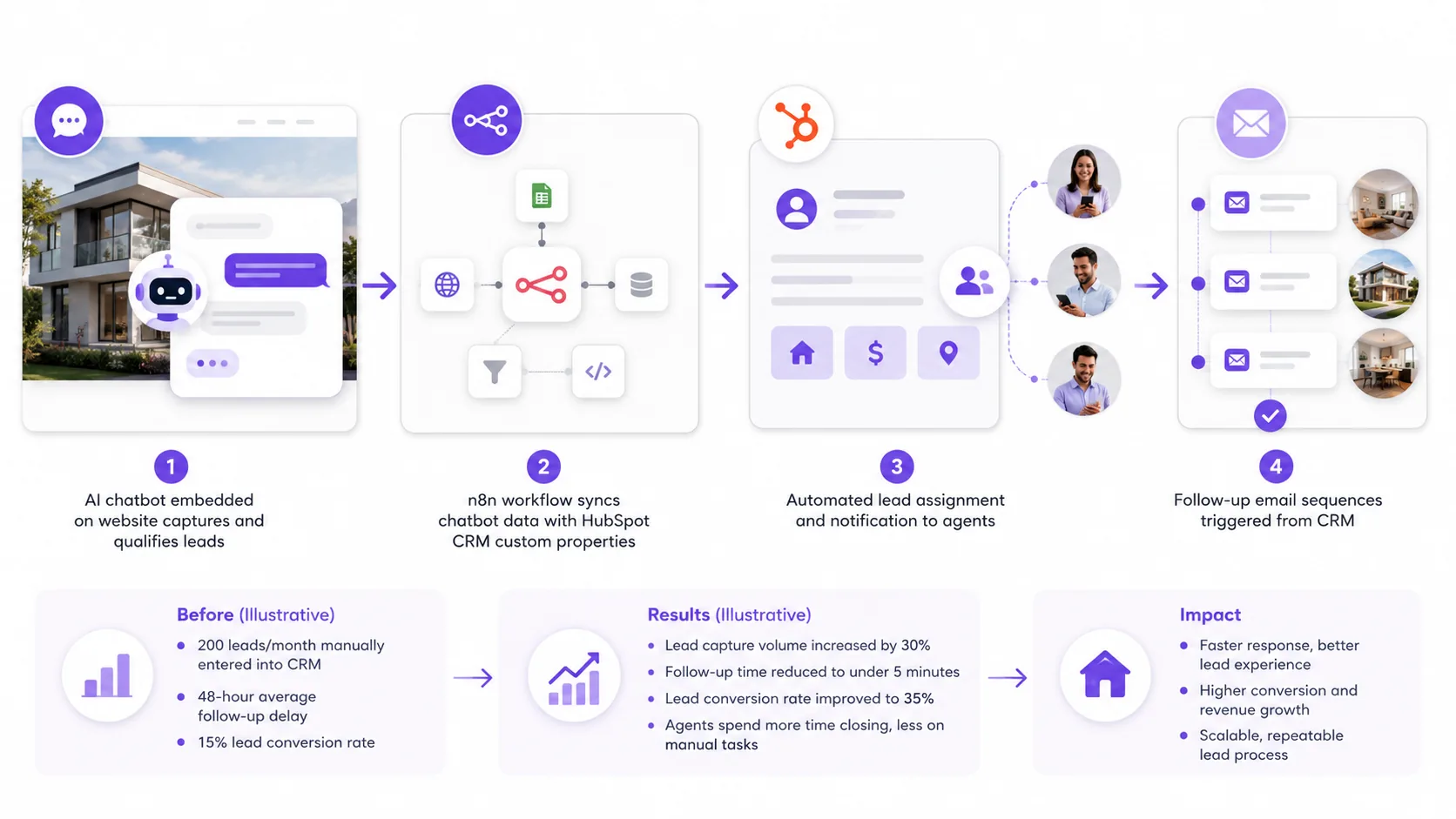
Before:
- 200 leads/month manually entered into CRM (illustrative example)
- 48-hour average follow-up delay
- 15% lead conversion rate (illustrative)
Challenges faced:
- Manual data entry caused delays and errors
- Inconsistent lead qualification led to missed opportunities
- Limited visibility on lead status for agents
Solution implemented:
Results:
- Lead capture volume increased by 30% (illustrative)
- Follow-up time reduced to under 2 hours
- Conversion rate improved to 22% (illustrative)
- Agents reported higher satisfaction due to clear lead assignment and timely notifications
This workflow not only reduced manual data entry but also ensured every lead was followed up quickly, with personalized messaging based on chatbot responses. For more on building similar workflows, see our n8n lead follow-up automation guide.
Roadmap for implementing real estate lead automation with AI chatbots and CRM sync
Rolling out automation for real estate lead capture is a multi-step process. Here is a practical roadmap based on our client projects, with detailed phases and timelines:
- Discovery (1-2 weeks): Define your ideal lead profile, qualification questions, and CRM fields. Map out which data needs to flow from chatbot to CRM. Conduct stakeholder interviews to align goals.
- Prototype chatbot scripts (2-3 weeks): Draft short, focused chatbot conversations. Test with real users to spot friction points. Iterate scripts based on feedback to optimize engagement.
- Build automation workflows (2-4 weeks): Use n8n (or your chosen platform) to wire up chatbot input, data mapping, and CRM sync. Include error handling and notifications. Develop fallback paths for unrecognized inputs.
- Integrate and test (1-2 weeks): Connect the chatbot to your CRM (e.g., HubSpot, Salesforce, or Zoho). Test with sample leads to ensure data lands in the right fields. Perform end-to-end testing including notifications and lead assignment.
- Train your team (1 week): Run onboarding sessions for agents and marketing staff. Show them how leads will appear in the CRM and how to use new automation features. Provide quick reference guides and FAQs.
- Pilot and monitor (4-6 weeks): Launch with a subset of your website traffic. Track KPIs like lead volume, response time, and conversion rate. Use analytics to identify drop-off points and iterate scripts and workflows based on feedback.
- Scale up (ongoing): Once proven, roll out automation across all marketing channels (website, landing pages, ads). Consider adding SMS or WhatsApp follow-ups for higher engagement. Regularly review system performance and update chatbot content.
For a detailed step-by-step, see our AI chatbot implementation guide.
FAQ for real estate lead automation with AI chatbots
- What CRM platforms work best with AI chatbots? HubSpot, Salesforce, and Zoho are the most common. All support API integration, but HubSpot offers built-in chatbot and workflow tools for faster setup. For custom logic, n8n or Zapier can connect almost any chatbot to your CRM.
- How to ensure data privacy and compliance? Use chatbot scripts that include consent language and opt-ins. Store lead data only in secure, compliant CRMs. For EU/UK, ensure your automation stack supports GDPR. n8n and HubSpot both offer compliance features, but always review your local rules.
- Can AI chatbots handle complex lead qualification? Yes, but keep initial conversations short. For advanced qualification, use branching logic in n8n or Make, or escalate to a human agent when needed. AI chatbots can score leads, ask follow-ups, and even schedule viewings if integrated with your calendar.
- What are typical integration challenges? Data mapping (chatbot fields to CRM properties), handling duplicate leads, and managing API rate limits. We recommend building error handling into your workflows and testing with edge cases before launch.
- How to measure success of automation? Track metrics like lead response time, conversion rate, and agent workload. Compare before/after numbers to see impact. Most teams see faster follow-up and higher conversion within weeks of launch (illustrative).
Still have questions? Contact Prompt Gurru for a tailored consultation.
Practitioner insights from Prompt Gurru
In our client projects, the most successful real estate lead automations share a few traits. Here are some practitioner tips from building n8n, OpenAI, and CRM workflows for agencies and brokers:
- Use n8n for flexible workflow orchestration and OpenAI API integration. We often build flows where the chatbot (OpenAI or Dialogflow) sends lead data to an n8n webhook, which then maps fields to HubSpot CRM custom properties and triggers notifications.
- Keep chatbot conversations short and focused. Drop-off rates spike when you ask more than 5 questions up front. Use progressive profiling , collect more info after initial contact.
- Map CRM custom properties carefully. In n8n, we use the Set and HTTP Request nodes to ensure every chatbot field lands in the right CRM property. Always test with edge cases (e.g., missing phone number).
- Plan for ongoing testing and optimization. Lead sources, chatbot scripts, and CRM fields change over time. Schedule quarterly reviews to catch issues early.
- Consider a hybrid approach. Many teams start with Zapier or Make for quick wins, then move to n8n for advanced logic or self-hosting. Custom connectors can bridge gaps between off-the-shelf tools and your CRM.
"Don't try to automate every edge case from day one. Start with your most common lead flows, prove the value, and expand from there. We've seen the best results when teams pilot with one channel, then scale."
For more on our approach, see our custom automation pricing guide or AI automation services.
About the author
Prompt Gurru Team is an AI automation and custom software studio with over 10 years of experience building n8n workflows, OpenAI integrations, and CRM sync solutions for startups and SMEs worldwide. Our shipped work includes Max Invoice, Max HR, Mindway, holo, and Wahy Institute , live on Google Play, the App Store, and the web. Trusted by founders at Max ERP, Mindway, Zeebrix, and Wahy Institute.
- 10+ years experience
- Industries served: B2B services, marketing agencies, e-commerce, SaaS startups
- Expertise: n8n workflow automation, OpenAI API integrations, AI chatbots and lead qualification, CRM and marketing automation, Flutter cross-platform apps, FastAPI and Python backends, Facebook ad optimization tooling
- Custom build ranges in our articles are illustrative US market estimates for scoped n8n/OpenAI/CRM work; request a discovery call for a quote on your stack.
Learn more at promptgurru.com or contact us.
Additional Resources
Ready to automate your business?
We build n8n workflows, AI pipelines, Flutter apps, and custom software for startups and SMEs - like the system that powers this blog.
Book a free discovery call