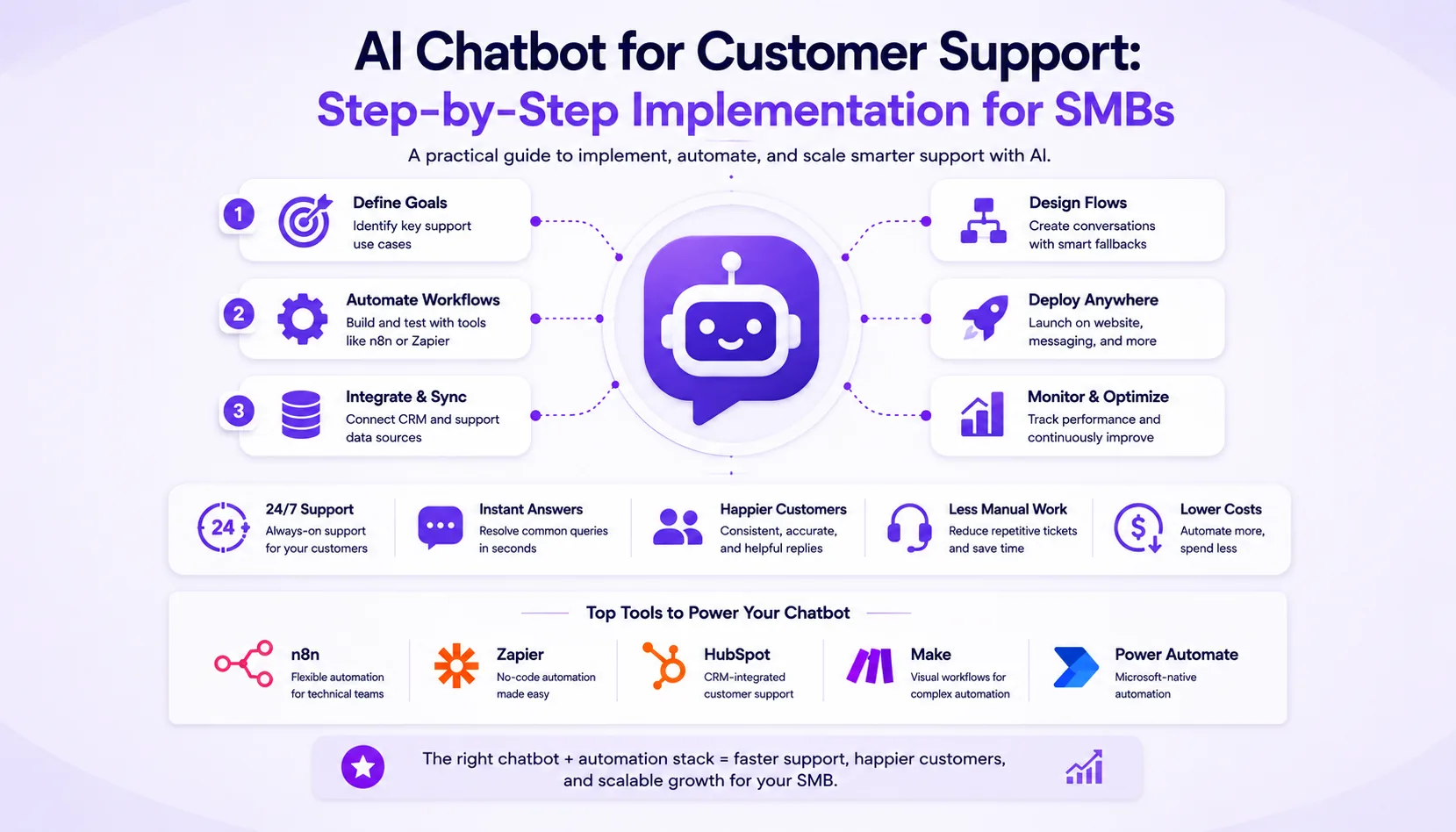
This guide walks SMB owners and ops leads through the practical steps, tool choices, and pricing to implement an AI chatbot for customer support. Compare platforms, see cost breakdowns, and learn when to hire a team like Prompt Gurru for custom workflows.
Step-by-step process to implement an AI chatbot for SMB customer support
If you want to add an AI chatbot to your small business support stack, here is a clear step-by-step process you can follow. This sequence covers everything from defining your goals to optimizing the chatbot after launch. This guide also covers AI chatbot customer support, SMB chatbot implementation, and chatbot automation pricing.
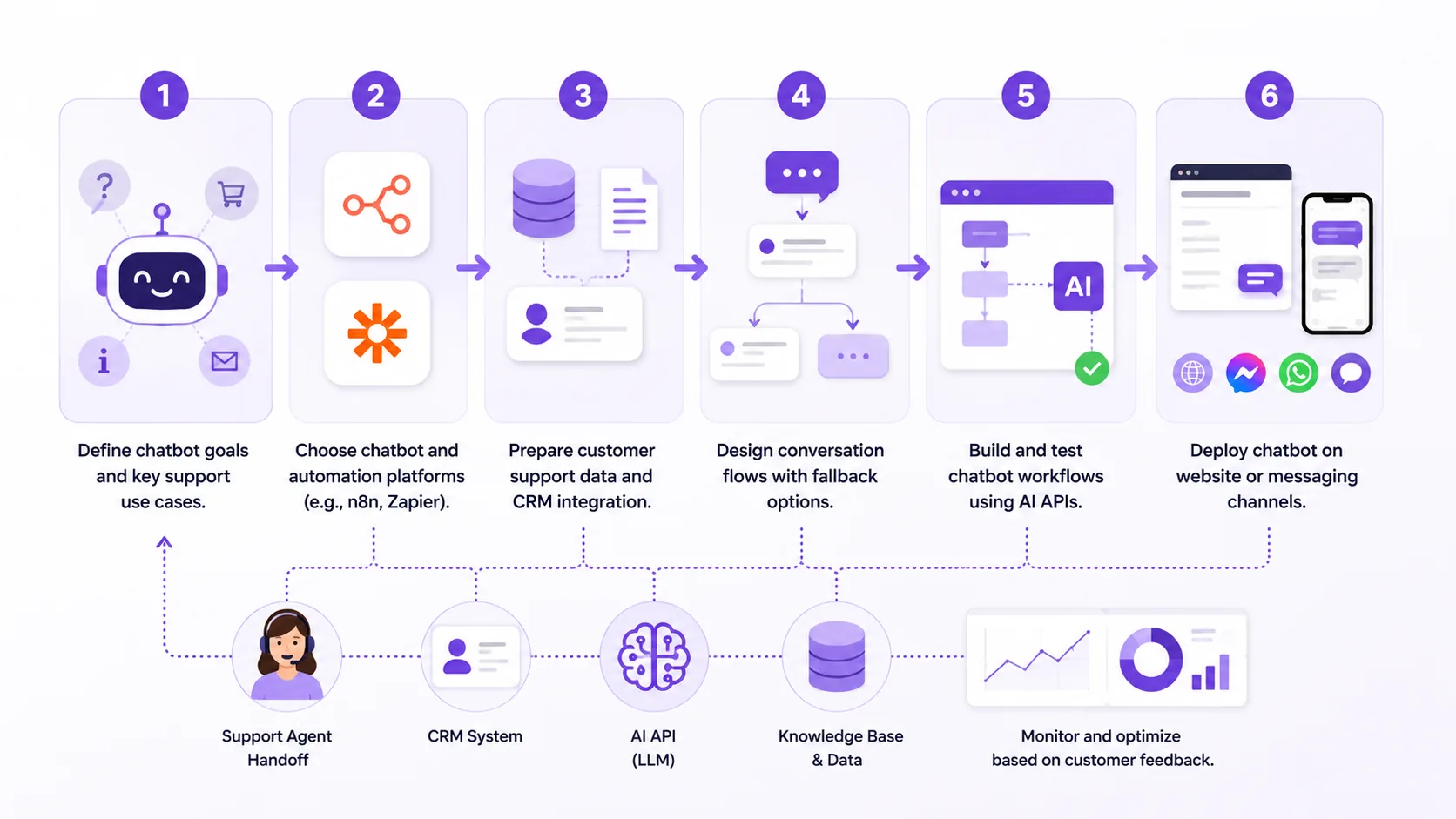
- Define chatbot goals and key support use cases.
- Choose chatbot and automation platforms (e.g., n8n, Zapier).
- Prepare customer support data and CRM integration.
- Design conversation flows with fallback options.
- Build and test chatbot workflows using AI APIs.
- Deploy chatbot on website or messaging channels.
- Monitor and optimize based on customer feedback.
Each step builds on the last, so don't skip ahead. If you want a deeper look into automation discovery, see How to audit your business for automation opportunities in one afternoon.
How AI chatbots improve SMB customer support: practical overview
AI chatbots can be very helpful for small and midsize businesses facing support bottlenecks. Many SMBs deal with limited staff, slow response times, and repetitive questions that consume valuable hours.
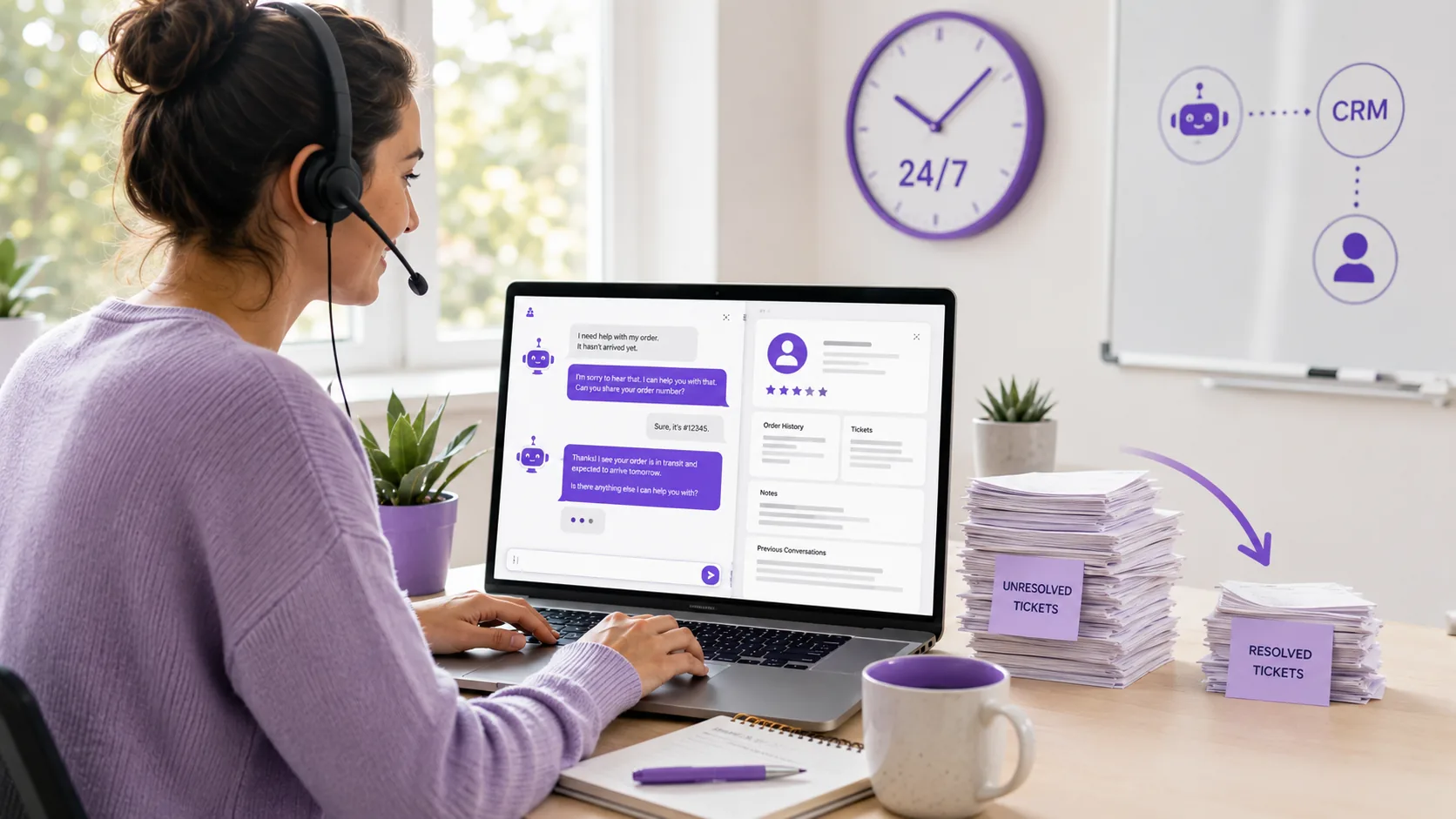
Chatbots can answer common questions instantly, qualify leads, and route tickets to the right person. When integrated with your CRM or helpdesk, they keep customer context and history in sync. This means your team spends less time on repetitive emails and more time on complex cases.
Benefits include 24/7 support, consistent replies, and less manual work. But there are constraints: chatbots need clean, well-organized support data to work well, and you must plan for fallback to human agents when the AI is unsure. Costs can add up if you have high conversation volume or need advanced integrations. For more on automation tool choices, see AI Automation Tools for Small Business 2026.
Common mistakes when implementing AI chatbots for SMB customer support
Automating a broken process instead of fixing it first
Many SMBs try to automate their existing support process without first mapping out and fixing inefficiencies. If your workflow is unclear or inconsistent, the chatbot will just repeat the same mistakes, only faster. Always review and streamline your process before building automation.
Underestimating Zapier/Make task or operation volume at scale
It's easy to overlook how quickly task or operation counts can add up with chatbots. Each customer interaction may trigger multiple automations. We've seen teams surprised by sudden cost spikes on Zapier or Make when their chatbot goes live. Always estimate your monthly volume and check your plan's limits.
Poor CRM or data hygiene breaking downstream automations
If your CRM or support data is messy or incomplete, chatbots can make things worse. Incorrect customer info or missing fields can cause ticket routing errors and frustrate both customers and agents. Before launching, audit your data and set up validation steps in your workflows.
Comparison of popular chatbot and automation platforms for SMBs
Choosing the right chatbot and automation platform is important for SMBs. Here is a side-by-side comparison of the most common tools we see in client projects.
| Tool | Deployment/self-hosting | Best for | Ease of use | Execution or scale limits | AI or custom code support | Pricing summary (tiers, billing period) | Key limitation |
|---|---|---|---|---|---|---|---|
| n8n | Self-hosted or cloud | Custom workflows, deep integrations | Moderate | No hard task limits (self-hosted); cloud plans vary | Strong AI integration, custom code nodes | Free (self-hosted) or paid cloud (EUR, as of June 2026). See n8n pricing | Requires technical setup; hosting cost extra for self-hosted |
| Zapier | Cloud SaaS | No-code integrations, quick setup | Very easy | Task limits per plan (100+/month free, more on paid) | Limited AI steps; some OpenAI support | Free (100 tasks/month), paid Professional/Team tiers (task-based), as of June 2026. See Zapier pricing | Can get costly at scale; limited for complex branching |
| Make | Cloud SaaS | Visual automation, complex workflows | Moderate | Operation/credit limits per plan | Supports AI modules, custom HTTP | See official Make pricing | Credit-based billing can spike with high volume |
| HubSpot Service Hub | Cloud SaaS | CRM-integrated chatbots, ticketing | Easy | User limits by plan; chatbot in higher tiers | AI chatbots included in upper tiers | See official HubSpot pricing (monthly, onboarding fees apply) | Higher tiers needed for advanced chatbot features |
| Microsoft Power Automate | Cloud SaaS | Microsoft 365 users, process automation | Moderate | Per-user or per-flow plan limits | AI Builder add-ons, custom connectors | From $15/user/month, paid yearly, as of June 2026. See Power Automate pricing | Complex licensing; best for MS-centric stacks |
Pricing disclaimer: Prices as of June 2026; always check official vendor pricing pages for the latest details. For more on custom vs SaaS automation, see When to Hire a Custom Software Developer vs Buying SaaS Tools.

Pricing overview and total cost of ownership for SMB AI chatbot projects
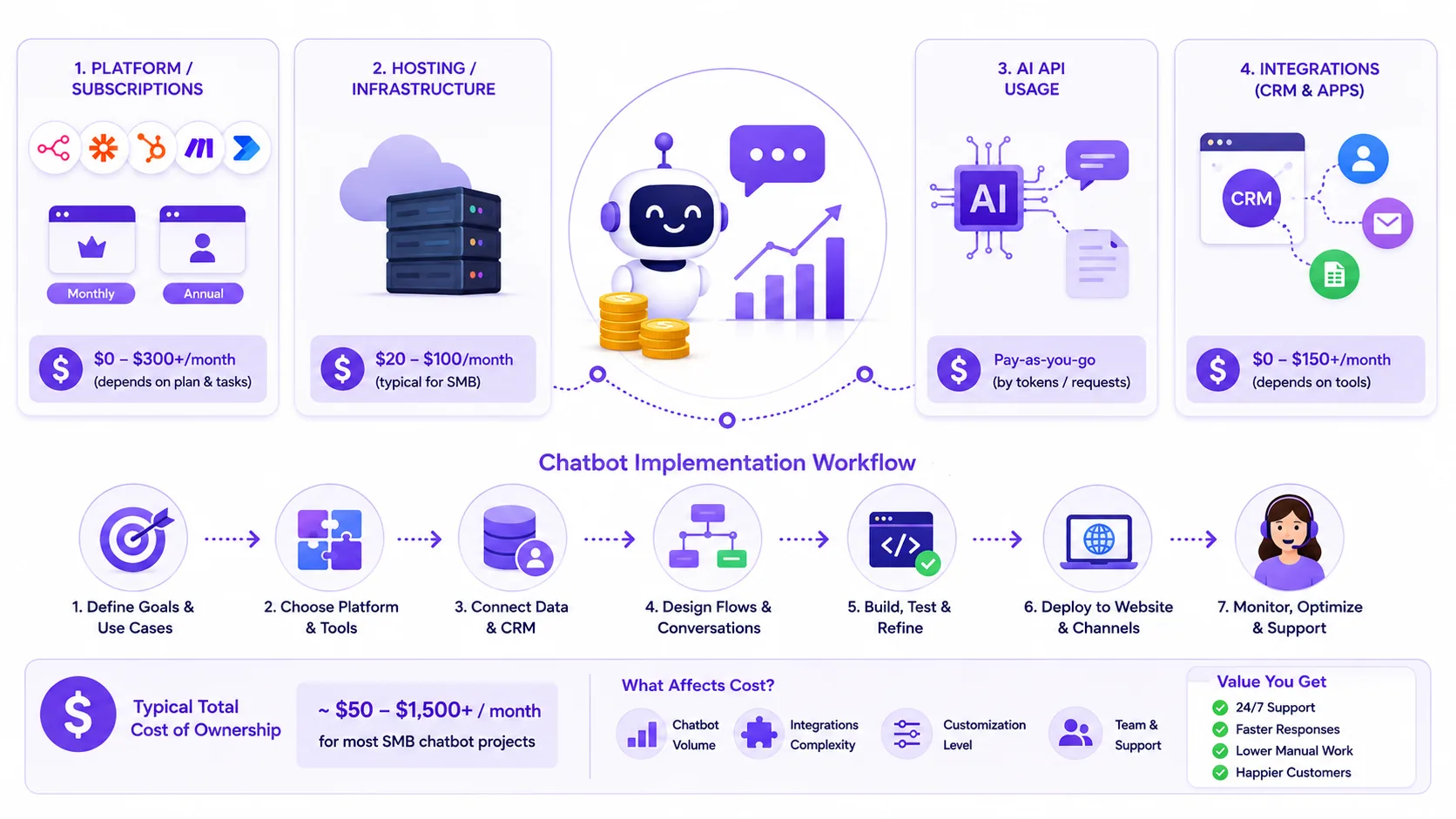
Pricing for AI chatbot projects varies depending on the platform, level of customization, and integration needs. Here is what SMBs should expect when budgeting for chatbot automation.
n8n
- Self-hosted Community edition: Free (software), but you pay for your own server/cloud VM (typically $20 to $100/month for small workloads).
- Cloud plans: Paid, billed in EUR. See n8n pricing for current tiers as of June 2026.
- OpenAI API usage: Pay-as-you-go, billed by tokens/requests.
- Integration with CRM (e.g., HubSpot): May require paid CRM tier.
Zapier
- Free plan: 100 tasks/month (suitable for very low volume).
- Paid plans: Professional/Team tiers, task-based billing. See Zapier pricing as of June 2026.
- Costs scale with number of chatbot conversations and automations triggered.
Make
- Credit/operation-based billing. See official Make pricing.
- Costs depend on number of operations (each chatbot step may use multiple credits).
HubSpot Service Hub
- Monthly subscription, chatbot features in higher tiers. See official HubSpot pricing.
- Mandatory onboarding fees for Professional and above.
Microsoft Power Automate
- From $15/user/month, paid yearly (as of June 2026). See Power Automate pricing.
- AI Builder add-ons may be extra.
Total cost of ownership
- Custom build (illustrative US agency range): $15,000 to $40,000 for scoped chatbot + CRM integration (includes discovery, build, testing, training).
- Maintenance/support retainer: $500 to $1,500/month depending on complexity and support needs.
- Ongoing SaaS and hosting fees: $100 to $600/month typical for SMBs, depending on stack and usage.
- Cost drivers: chatbot conversation volume, AI API usage, integration complexity, fallback agent routing.
Custom build ranges in this article reflect Prompt Gurru's US market experience with n8n, OpenAI, and CRM integrations for startups and SMEs. Ranges include discovery, workflow build, testing, documentation, and team training unless noted. For a tailored quote, contact Prompt Gurru.
Disclaimer: All SaaS prices are indicative as of June 2026 and may change. Always check the official vendor pricing pages for current details: n8n, Zapier, Make, HubSpot, Power Automate.
Case study: Implementing an AI chatbot for a 15-employee e-commerce SMB (illustrative example)
Let's look at an illustrative example of a 15-person e-commerce business struggling with repetitive support emails and slow response times.
Before
Illustrative example: The team had 15 staff, with 30 hours per week spent answering repetitive support emails. Customers often waited hours for a reply, and satisfaction scores were slipping.
Solution
The chatbot was deployed on the website and connected to n8n via webhook. n8n called the OpenAI API for chat completions, then created HubSpot tickets for complex or low-confidence queries. Weekly reports were sent to the support manager for review.
Results
After launch, the business saw much faster response times and an illustrative 40% reduction in manual tickets. Customer satisfaction improved, and staff could focus on higher-value work. The estimated project cost was $25,000 (discovery, build, testing, training), with ongoing SaaS and hosting fees of $300 to $600/month. This is an illustrative example only; actual results and costs will vary by business and stack.
For more examples of automation in action, see How to automate lead follow-up emails with n8n and your CRM.
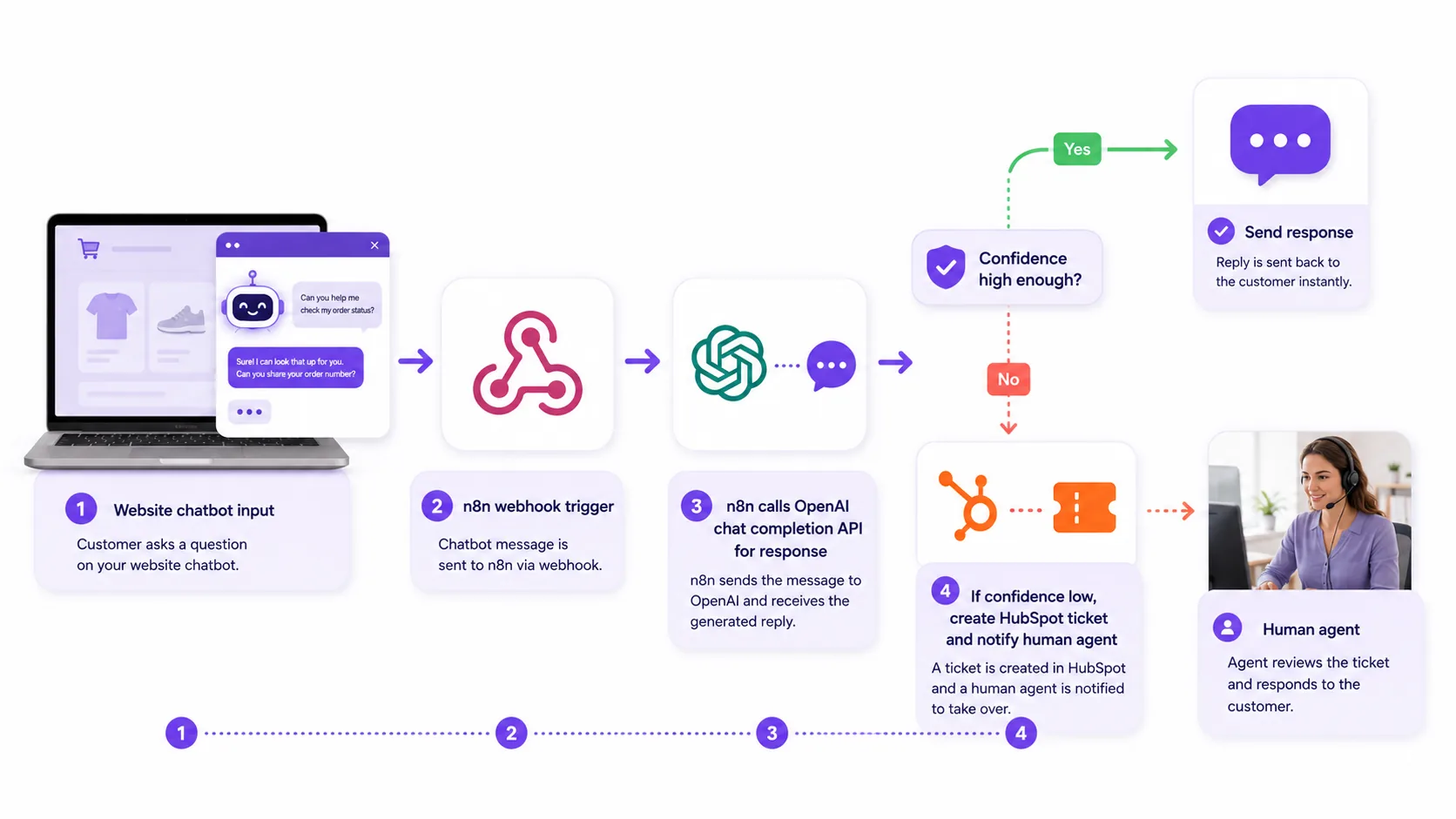
Roadmap for SMBs to implement AI chatbots in customer support
Ready to get started? Here is a practical roadmap for SMBs looking to implement AI chatbots in their support process:
For more on planning automation projects, see How much does custom workflow automation cost for a small business?.
FAQ: Common questions SMBs ask about AI chatbots for support
What platforms work best for SMB chatbots with limited budgets?
For SMBs on a tight budget, n8n (self-hosted) and Zapier (free or entry plans) are popular choices. n8n is free if you self-host, but requires some technical setup. Zapier is very easy to use, but costs can rise with high task volume. For more pricing info, see n8n pricing and Zapier pricing.
How much technical skill is needed to maintain AI chatbots?
Platforms like Zapier and HubSpot require minimal technical skill, most SMBs can manage basic workflows in-house. n8n and Make offer more flexibility but need some technical know-how, especially for custom integrations. If you want a no-code experience, stick with Zapier or HubSpot. For more complex needs, consider hiring a partner like Prompt Gurru.
Can AI chatbots handle complex customer issues or only FAQs?
AI chatbots excel at answering common questions and handling routine tasks. With good training data and integration, they can triage and route more complex issues, but true edge cases or nuanced problems still need a human. Always plan for a smooth handoff to agents when the chatbot is unsure.
How do chatbots integrate with popular CRMs like HubSpot or Salesforce?
Most chatbot platforms offer native or API-based integrations with major CRMs. For example, n8n and Zapier both have nodes for HubSpot and Salesforce, allowing you to create tickets, update contacts, or log conversations automatically. HubSpot Service Hub includes built-in chatbot features for CRM-connected support.
What are typical monthly costs including AI API usage and automation tools?
Monthly costs vary by platform and usage. For a small team, expect $100 to $600/month for SaaS tools, hosting, and AI API usage. High-volume chatbots or advanced integrations may cost more. Always check your platform's pricing page and estimate your expected volume before launch.
How to measure chatbot success and ROI?
Key metrics include reduction in manual tickets, faster response times, improved customer satisfaction, and lower support costs. Track these before and after launch to see the impact. For more on measuring automation ROI, see How much does custom workflow automation cost for a small business?.
Practitioner workflow: How Prompt Gurru builds AI chatbot automation for SMBs
Here's how we typically approach SMB chatbot automation projects at Prompt Gurru. This process is based on many client projects using n8n, OpenAI, and CRM integrations:
We start with a discovery call to understand your support needs and volume. Next, we audit your data and map out CRM integration points. Conversation flows are designed in the n8n workflow editor, using OpenAI's JSON mode for precise control. We build webhook-triggered workflows that connect your website chatbot to OpenAI and your CRM (like HubSpot). Testing covers both typical queries and fallback scenarios. After team training and documentation handoff, we support deployment and set up monitoring dashboards. Ongoing optimization is based on usage metrics and customer feedback.
Practitioner tip: "Always include a fallback to human agents in your chatbot workflow. Even the best AI will get stumped sometimes, and a smooth handoff is key to customer satisfaction."
If you want to discuss your support automation project, book a free discovery call with our team.
About the author
Prompt Gurru Team , AI automation and custom software studio
We design and ship production automations and apps for startups and SMEs: n8n orchestration, OpenAI pipelines, Flutter clients, and FastAPI backends. Our team has 5+ years combined experience shipping client automations in industries like B2B services, marketing agencies, e-commerce, and SaaS startups.
- Expertise: n8n process automation, OpenAI API integrations, AI chatbots and lead qualification, CRM and marketing automation, Flutter cross-platform apps, FastAPI and Python backends, Facebook ad optimization tooling
- Custom build ranges in our articles are illustrative US market estimates for scoped n8n/OpenAI/CRM work; request a discovery call for a quote on your stack.
- Contact: Contact Prompt Gurru or Book a free discovery call
Additional Resources
Ready to automate your business?
We build n8n workflows, AI pipelines, Flutter apps, and custom software for startups and SMEs - like the system that powers this blog.
Book a free discovery call