
Learn the practical steps, tool options, and pricing to implement an AI chatbot that qualifies leads on your website. This guide covers workflow design, platform comparisons, and when to hire automation experts. By the end, you'll know how to scope, budget, and launch a chatbot that syncs with your CRM and improves lead quality.
If you want your website to capture more qualified leads without drowning your team in manual follow-up, an AI chatbot for lead qualification is a practical solution. This article breaks down the exact steps, tool options, and pricing details you need to get started. Whether you're a business owner, ops lead, or technical manager, you'll learn how to scope, build, and launch a chatbot that actually improves sales outcomes. We'll cover platform comparisons, workflow design, and when it makes sense to bring in automation specialists like Prompt Gurru. This guide also covers chatbot automation pricing and n8n chatbot workflow.
Step-by-step checklist to build an AI chatbot for lead qualification
Building an AI chatbot for lead qualification requires a clear plan to ensure it supports your sales process effectively. Here's a practical checklist to get you started:
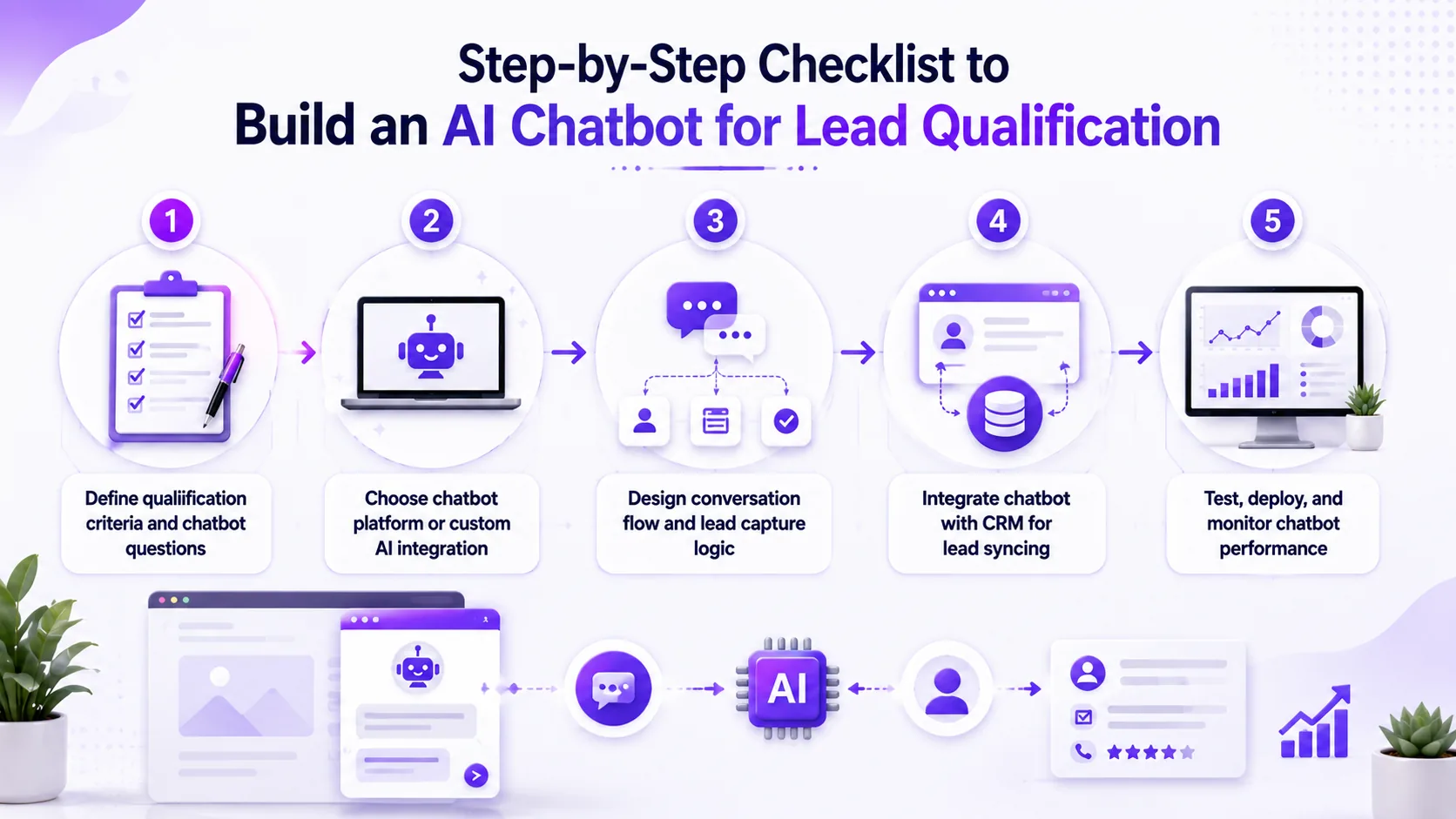
- Define qualification criteria and chatbot questions
- Choose chatbot platform or custom AI integration
- Design conversation flow and lead capture logic
- Integrate chatbot with CRM for lead syncing
- Test, deploy, and monitor chatbot performance
- Set up analytics and reporting dashboards
- Train sales and marketing teams on chatbot use and lead follow-up
- Plan for ongoing maintenance and updates
Define qualification criteria and chatbot questions
Start by mapping out what makes a lead qualified for your business. This could be budget, company size, use case, or timeline. Collaborate with sales and marketing teams to ensure alignment on key questions.
Choose chatbot platform or custom AI integration
Decide if you'll use an off-the-shelf chatbot platform (like HubSpot or Intercom) or build a custom solution with n8n and OpenAI. Consider your team's technical skills, budget, and integration needs.
Design conversation flow and lead capture logic
The conversation flow should guide visitors through key questions, capture their info, and branch based on their responses. Use flowcharts or tools like Miro to visualize the dialogue paths.
Integrate chatbot with CRM for lead syncing
Integration with your CRM (such as HubSpot or Salesforce) ensures no qualified lead is lost. Map chatbot responses to CRM fields and set up triggers for alerts or follow-ups.
Test, deploy, and monitor chatbot performance
Test the chatbot with real users and monitor performance to refine your approach. Use analytics dashboards to track engagement, qualification rates, and lead quality. Choose chatbot monitoring tools that provide real-time insights and error alerts to maintain high performance.
Set up analytics and reporting dashboards
Establish dashboards to visualize chatbot interactions, lead qualification rates, and conversion metrics. Tools like Google Analytics, HubSpot reporting, or custom n8n workflows can help track performance over time.
Train sales and marketing teams on chatbot use and lead follow-up
Ensure your teams understand how chatbot leads are qualified and routed. Provide training on reviewing chatbot data, handling alerts, and following up promptly to maximize conversion.
Plan for ongoing maintenance and updates
Schedule regular reviews to update chatbot questions, flows, and AI prompts based on user feedback and sales input. Keep integrations and platform versions current to avoid disruptions.
Common mistakes when building AI chatbots for lead qualification
Even with the right tools, it's easy to run into pitfalls that waste time and budget. Here are three mistakes we see often in client projects:

Automating a broken lead qualification process
Many teams rush to automate before they've nailed down what a qualified lead actually looks like. If your sales team can't agree on criteria or your current process is inconsistent, automating it will only make things worse. Always fix the underlying qualification logic and questions before wiring up a chatbot.
Underestimating task volume and API call limits
Platforms like Zapier, Make, and n8n have task or operation limits that can catch you off guard. A chatbot that gets 100 chats a day can quickly rack up thousands of tasks per month, especially if you're syncing with a CRM or running AI calls. We've seen teams blow through free or entry-level plans in weeks. Always estimate your monthly volume before committing to a platform.
Poor CRM data hygiene breaking downstream automations
If your CRM is full of duplicates, missing fields, or inconsistent data, your chatbot's lead scoring and follow-up automations will break. We've rebuilt several automations for clients after discovering their CRM wasn't ready for automated lead syncing due to poor data hygiene. Clean up your CRM by removing duplicates, standardizing fields, and enforcing data entry rules before connecting a chatbot. This ensures reliable lead scoring and smooth automation workflows.
Comparison of popular chatbot and automation tools for lead qualification
Choosing the right platform depends on your technical skills, integration needs, and budget. Here's a side-by-side look at the most common tools we use and recommend for AI chatbot lead qualification:
| Tool | Deployment/self-hosting | Best for | Ease of use | Execution or scale limits | AI or custom code support | Pricing summary | Key limitation |
|---|---|---|---|---|---|---|---|
| n8n | Self-hosted or cloud | Flexible AI workflows | Moderate | No hard task limits (self-hosted) | Full OpenAI API, custom logic | See official n8n pricing - Free community, paid cloud from approx. $20/mo (pricing as of early 2024) | Requires hosting/maintenance |
| Zapier | Cloud only | No-code teams | Very easy | Task limits by plan | Limited AI, some OpenAI support | See official Zapier pricing - Free (100 tasks/mo), Pro $49/mo, Team $299/mo (pricing as of early 2024) | Task-based billing can get expensive |
| Make | Cloud only | Visual automation | Moderate | Credit-based operations | AI modules, custom HTTP | See official Make pricing | Credit usage can add cost at scale |
| HubSpot | Cloud CRM + chatbot | Integrated marketing | Easy | Contact limits, API quotas | Built-in AI, some customization | See official HubSpot pricing | Onboarding fees, limited branching |
| Microsoft Power Automate | Cloud | Microsoft 365 users | Moderate | Per-user/flow limits | AI connectors, custom scripts | See official Power Automate pricing - $15/user/mo for premium (pricing as of early 2024) | Complex for non-MS stacks |
Each tool has trade-offs. n8n is our go-to for custom workflows and OpenAI integration, but you'll need to handle hosting or pay for cloud. Zapier is great for no-code teams but can get pricey as volume grows. Make offers visual flow building but watch credit usage. HubSpot is ideal if you already use their CRM, and Power Automate fits best in Microsoft-centric environments. For more on choosing between custom and SaaS, see our guide on custom software vs SaaS tools.
Key limitations include the need for technical maintenance with self-hosted solutions like n8n, potential high costs with task-based billing on Zapier, and limited AI customization on some platforms. Always evaluate your team's skills and volume needs before choosing.
Pricing overview and total cost of ownership for AI chatbot lead qualification
Budgeting for an AI chatbot project means looking beyond monthly subscription fees. Here's what you can expect for the most common platforms and a custom build, as of early 2024 (prices subject to change and may vary by region or usage):
n8n
- Community edition is free (self-hosted); paid cloud plans from approximately $20/month (see n8n pricing)
- Self-hosting requires server costs (typically $20 to $100/month for small deployments)
- Ongoing maintenance retainer: $1,000 to $3,000/year (illustrative US range)
Zapier
- Free tier: 100 tasks/month
- Professional: $49/month, Team: $299/month (pricing as of early 2024) (see Zapier pricing)
- Task volume is the main cost driver; high-traffic sites may need Team or higher
Make
- Credit/operation-based plans; see official Make pricing
- Credit usage depends on number of chatbot sessions and integrations
HubSpot
- Hub-tier pricing per month; Professional plan includes mandatory onboarding fees
- See official HubSpot pricing
- Contact and API limits may apply; onboarding fees are a one-time cost
Microsoft Power Automate
- Premium plans from $15/user/month (pricing as of early 2024) (see Power Automate pricing)
- Best for organizations already using Microsoft 365
Total cost of ownership
- Custom build (illustrative US range): $15,000 to $40,000 for scoped n8n/OpenAI/CRM chatbot, including discovery, workflow build, testing, documentation, and team training
- Annual maintenance and revision scope should be budgeted separately
- API usage (e.g., OpenAI) may add variable monthly costs depending on chat volume
Prices are indicative as of early 2024 and vary by scope, region, and vendor updates. Actual costs may differ based on usage, location, and vendor pricing changes. Always check the n8n, Zapier, Make, HubSpot, and Power Automate vendor pages for current details.
Prompt Gurru note: Custom build ranges above are illustrative US market estimates for scoped n8n/OpenAI/CRM work. For a tailored quote, contact Prompt Gurru or book a discovery call.
Case study: AI chatbot lead qualification for a 15-person B2B services firm (illustrative example)
To show how these pieces fit together, here's an illustrative example based on a typical SMB client project.
Before
Illustrative example: A 15-person B2B services firm spent about 10 hours per week manually qualifying inbound leads from their website. The process was inconsistent, with sales staff sometimes missing key data or following up late. Lead data often landed in email inboxes, not the CRM.
Solution
We built a chatbot on the firm's website that routed chat input to an n8n webhook. n8n called the OpenAI chat API to ask qualifying questions and interpret responses. Based on the answers, the workflow branched: qualified leads were pushed to HubSpot CRM with custom properties, and sales got an instant email alert. The chatbot handled multiple paths, including fallback for unclear answers.
Results
Illustrative outcomes: The firm saw consistent lead qualification, with all key data captured in HubSpot. Manual hours dropped, and sales follow-up was faster and more reliable. The estimated project cost was $25,000, including workflow build, CRM integration, and staff training. Ongoing maintenance was budgeted at $2,000/year.
Roadmap to implement AI chatbot lead qualification
Rolling out an AI chatbot is not a one-and-done project. Here's how we recommend phasing your implementation for best results, with detailed milestones and tasks:
- Phase 1: Discovery and Planning (Weeks 1-2)
- Conduct stakeholder interviews to define lead qualification criteria and chatbot goals.
- Audit existing lead capture and CRM processes for gaps and data quality.
- Choose chatbot platform or custom build approach based on technical and budget constraints.
- Draft initial conversation flows and question sets aligned with sales team input.
- Establish success metrics and KPIs to measure chatbot impact.
- Develop project timeline and assign roles for implementation tasks.
- Phase 2: Prototype and Pilot (Weeks 3-5)
- Develop a working chatbot prototype using selected tools (e.g., n8n + OpenAI or HubSpot chatbot).
- Deploy pilot chatbot on select website pages or to a limited visitor segment.
- Train sales and marketing teams on chatbot functionality and lead handling.
- Collect user feedback and chatbot performance data for refinement.
- Monitor chatbot interactions for bugs, drop-offs, and user satisfaction.
- Adjust conversation flows and qualification logic based on pilot findings.
- Phase 3: Refinement and Integration (Weeks 6-8)
- Iterate conversation flows and AI prompts based on pilot insights.
- Integrate chatbot data with CRM workflows, ensuring lead syncing and alerts work reliably.
- Implement data validation and error handling to improve lead data quality.
- Establish monitoring dashboards and KPIs for chatbot effectiveness.
- Automate follow-up tasks and alerts triggered by chatbot data.
- Document chatbot workflows and train team members on maintenance procedures.
- Phase 4: Full Launch and Scaling (Weeks 9-12)
- Roll out chatbot site-wide or to all target visitor segments.
- Expand integrations to other tools such as ad platforms or calendar booking if applicable.
- Schedule regular training sessions and documentation updates for sales and ops teams.
- Set up quarterly review cycles to update qualification criteria and chatbot logic as business needs evolve.
- Plan for scaling infrastructure and platform plans to handle increased volume.
- Gather ongoing user feedback and continuously optimize chatbot performance.
- Phase 5: Continuous Improvement and Support (Ongoing)
- Monitor chatbot analytics and lead conversion metrics regularly.
- Update AI models and conversation flows to adapt to changing customer behavior.
- Maintain integration health with CRM and other platforms.
- Provide ongoing training and support to sales and marketing teams.
- Plan for feature enhancements and technology upgrades as needed.
Tip from the field: "Don't skip the pilot phase. Testing your chatbot with real visitors on a few pages will surface issues you'd never catch in a sandbox. We've saved clients weeks of rework by catching edge cases early."
Frequently asked questions about AI chatbots for lead qualification
What's the difference between rule-based and AI chatbots for lead qualification?
Rule-based chatbots follow pre-set scripts and logic trees. They're good for simple Q&A or routing but can't handle nuanced conversations. AI chatbots, powered by models like OpenAI's GPT, can interpret open-ended responses, ask follow-up questions, and adapt to unexpected answers. For lead qualification, AI bots capture richer data but require more careful prompt design and testing.
How do I handle GDPR and privacy with chatbot data collection?
You're responsible for informing users about data collection and getting consent where required. Make sure your chatbot displays a privacy notice and links to your policy. Store lead data securely, limit access, and set up data deletion processes. Many platforms (like HubSpot and n8n) offer GDPR-friendly features, but you need to configure them correctly. Consult your legal team for compliance specifics.
Can I build a chatbot without coding skills? Which tools are best?
Yes, you can use no-code platforms like Zapier, Make, or HubSpot's built-in chatbot builder. These tools offer drag-and-drop interfaces and templates for basic lead qualification flows. For more advanced AI conversations or custom integrations, you may still need technical help. If you want a fully custom workflow, consider hiring a team like Prompt Gurru or exploring n8n with OpenAI integration.
How do AI chatbots integrate with CRMs like HubSpot or Salesforce?
Most chatbot platforms offer built-in connectors or APIs to sync lead data with CRMs. For example, n8n and Zapier both have HubSpot and Salesforce nodes. You can map chatbot responses to CRM fields, trigger follow-up tasks, and even update custom properties for lead scoring. Always test data mapping thoroughly to avoid sync errors or duplicates.
What are typical costs and timelines for chatbot projects?
Off-the-shelf chatbot tools can be set up in days to weeks, with costs ranging from free to several hundred dollars per month depending on volume. Custom builds (like n8n + OpenAI + CRM integration) typically run $15,000 to $40,000 (illustrative US range) and take 4 to 12 weeks, depending on complexity. Ongoing maintenance and API usage should be budgeted separately.
How do I measure the success of my AI chatbot?
Track metrics like lead qualification rate, conversion rate from chatbot leads, user engagement, and drop-off points in conversation flows. Use CRM data to assess lead quality and sales outcomes. Regularly review chatbot analytics dashboards and gather feedback from sales teams to refine the chatbot for better results.
When should I consider hiring experts to build or optimize my chatbot?
If your chatbot needs complex AI integration, custom CRM workflows, or advanced conversational design, hiring specialists can save time and improve outcomes. Experts can help with prompt engineering, workflow automation, and scaling. Consider professional help if your team lacks technical skills or if chatbot performance is below expectations.
Prompt Gurru practitioner workflow for AI chatbot lead qualification
Here's how we approach AI chatbot lead qualification projects for our clients, using n8n, OpenAI, and CRM integrations:
- We start with a discovery call to map your lead qualification criteria and CRM requirements.
- Prototype the chatbot conversation flow using OpenAI API and n8n webhook triggers.
- Build n8n workflows to handle chat input, run qualification logic, and update CRM custom properties (e.g., in HubSpot or Salesforce).
- Test the chatbot on a staging site with real visitor data, refining prompts and logic as needed.
- Deploy to production with monitoring dashboards (e.g., in n8n or your CRM).
- Train your team on chatbot management, lead review, and follow-up processes.
- Continuously monitor chatbot interactions and lead quality metrics to identify improvement areas.
- Iterate on AI prompts and qualification logic based on real-world data and sales feedback.
- Schedule regular check-ins with sales and marketing teams to align chatbot updates with evolving business goals.
- Document lessons learned and update workflows to incorporate new best practices and technology advances.
- Plan for periodic audits of chatbot performance and integration health to maintain high lead quality.
- Leverage automation tools like Zapier or custom scripts to streamline repetitive tasks and ensure timely lead follow-up.
- Maintain clear communication channels between development, sales, and marketing teams for rapid issue resolution and feature requests.
For a tailored workflow or to see if your stack is a fit, see our AI automation services or contact us for a discovery call.
About the author
Prompt Gurru Team
AI automation and custom software studio
We design and ship production automations and apps for startups and SMEs: n8n orchestration, OpenAI pipelines, Flutter clients, and FastAPI backends.
Experience: 5+ years combined team experience shipping client automations
Industries served: B2B services, marketing agencies, e-commerce, SaaS startups
Expertise:
- n8n workflow automation
- OpenAI API integrations
- AI chatbots and lead qualification
- CRM and marketing automation
- Flutter cross-platform apps
- FastAPI and Python backends
- Facebook ad optimization tooling
Custom build ranges in our articles are illustrative US market estimates for scoped n8n/OpenAI/CRM work; request a discovery call for a quote on your stack.
Visit Prompt Gurru
Additional Resources
To help you further explore AI chatbots and automation, here are curated resources with detailed guides and pricing information. These links provide practical insights and official vendor details to support your chatbot project:
- AI automation services - Learn about our tailored consulting and implementation offerings to accelerate your chatbot development and optimize lead qualification workflows.
- AI chatbot for customer support: step-by-step implementation for SMBs - A practical guide focused on customer support use cases that complements lead qualification workflows by improving customer engagement and response times.
- When to Hire a Custom Software Developer vs Buying SaaS Tools - Insights on choosing the right approach for your business needs and budget, helping you decide between custom chatbot builds or platform subscriptions.
- n8n pricing - Official pricing details for the n8n automation platform, including self-hosted and cloud plans, useful for planning your chatbot infrastructure costs.
- Zapier pricing - Up-to-date pricing for the popular no-code automation tool, useful for chatbot workflows and lead data integrations.
- Make pricing - Information on pricing tiers and credits for Make automation, helpful for visual workflow builders and scaling chatbot operations.
- HubSpot pricing - Details on HubSpot CRM and chatbot pricing plans, ideal if you use HubSpot as your CRM and want integrated marketing automation.
- Power Automate pricing - Microsoft Power Automate subscription options for Microsoft-centric environments, supporting AI connectors and custom scripts.
- Other articles - Explore more blog posts on AI, automation, and software development for broader context and ideas to enhance your chatbot projects.
- Contact us for inquiries - Reach out to Prompt Gurru for personalized advice, quotes, or to discuss your chatbot project and automation needs.
Ready to automate your business?
We build n8n workflows, AI pipelines, Flutter apps, and custom software for startups and SMEs - like the system that powers this blog.
Book a free discovery call