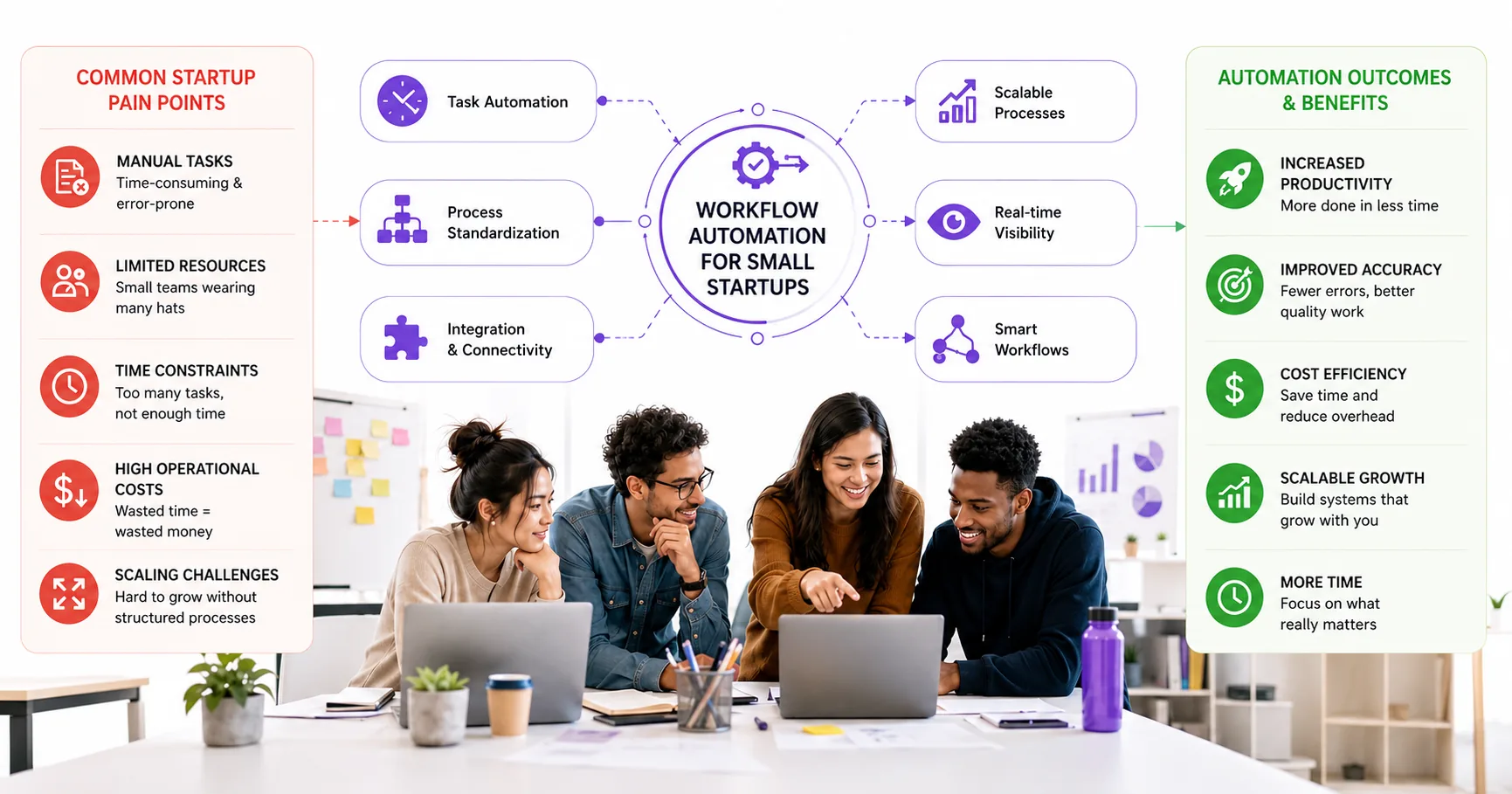
Discover affordable and effective workflow automation software tailored specifically for startups with fewer than 10 employees. This guide helps founders and operations leaders evaluate key criteria, compare top tools, and understand pricing to streamline operations and boost productivity.
Why Workflow Automation Matters for Startups Under 10 Employees
If you run a startup with fewer than 10 employees, you know how quickly manual tasks can drain your team's focus and slow down growth. Every hour spent on repetitive admin, onboarding, or chasing status updates is an hour not spent building your product or serving customers. The right workflow automation software for startups can change that—helping you automate routine processes, reduce errors, and free up your team to work on what matters most.
Affordable workflow automation is no longer just for big companies. Today, there are automation tools for small startups that let you streamline lead capture, employee onboarding, document approvals, and compliance tasks—often without writing code or hiring extra staff. According to Venture Harbour's guide to applicant tracking systems, even startups under 100 employees can now access multi-step automation and AI-powered workflows that used to require expensive enterprise software.
But with so many workflow software options under 10 employees, choosing the right platform can feel overwhelming. Pick the wrong tool, and you risk wasted budget or workflows that break as you scale. This guide is built for startup founders and ops leads who want practical, affordable automation—without the headaches. We’ll cover proven startup automation platforms, pricing, and real-world tips to help you make a confident decision.
If you want a deeper dive into how automation tools work behind the scenes, check out our article on how workflow automation software works and what to buy in 2026.
Key Criteria for Choosing Affordable Workflow Automation Software
For startups with fewer than 10 employees, picking the right workflow automation software is about more than just finding the lowest price. The best affordable workflow automation tools for small startups should help you save time, avoid manual errors, and scale as your business grows. Here are five essential criteria every founder or ops lead should use when evaluating options:
- 1. Ease of Use: Small teams rarely have dedicated IT support. Look for automation tools with a clear, no-code interface so anyone can build or tweak workflows. As ClearCompany notes, startups benefit most from platforms that avoid enterprise-grade complexity and focus on core needs.
- 2. Integration with Existing Apps: Your automation platform should connect easily with the tools you already use—email, CRM, project management, or accounting. Affordable workflow automation software often comes with pre-built connectors or templates, which are especially helpful for small teams. See this guide on applicant tracking systems for examples of multi-step automation and app integrations tailored to startups.
- 3. Scalability: Even if you have a tiny team now, your workflow software should grow with you. Check if the platform supports adding users, more complex automations, or new integrations as your needs evolve. Some tools offer tiered or pay-as-you-go pricing, letting you start small and upgrade later.
- 4. Transparent and Predictable Pricing: Every dollar matters for small startups. Prioritize automation platforms with clear, affordable pricing—ideally with a free tier or trial. Watch for hidden costs like task limits or premium connectors. For a breakdown of common pricing models, see our upcoming section on total cost of ownership.
- 5. Support and Community Resources: When you hit a snag, responsive support is crucial. Look for platforms with solid documentation, active user forums, or live chat. Some tools, as highlighted in this SOC 2 automation roundup, offer onboarding resources specifically for startups under 100 employees.
Before you choose any automation tools for small startups, map your current processes and identify where automation will have the most impact. Our workflow audit guide walks you through this step-by-step. By focusing on these criteria, you can select a startup automation platform that delivers real value without unnecessary complexity or cost.
Top Affordable Workflow Automation Software Options for Small Startups
For startups with fewer than 10 employees, the right workflow automation software can free up precious hours and help founders focus on growth. Here are four standout options that consistently meet the needs of small, agile teams:
- n8n: This open-source automation platform is popular among technical founders who want maximum flexibility and control. n8n supports 350+ integrations, lets you build custom multi-step workflows, and can be self-hosted for full data ownership. Its visual editor is approachable, but some setup knowledge is helpful. n8n is a strong fit for teams that want to automate lead capture, sync data between SaaS tools, or trigger AI-powered actions. For more on how startups use n8n, see this guide on automation for small businesses.
- Zapier: Designed for non-technical users, Zapier connects thousands of apps with a simple, no-code interface. Startups can automate tasks like sending notifications, updating spreadsheets, or onboarding new users using 'Zaps'—prebuilt or custom workflows. Zapier's template library is especially useful for small teams who want to automate without coding, and it now includes built-in AI features for smarter automations. According to ClearCo's onboarding software review, Zapier is a go-to for startups that need to automate admin and onboarding tasks quickly.
- Make (formerly Integromat): Make offers a visual drag-and-drop interface for building complex automations with branching logic. It's ideal for startups that want more control than Zapier but do not want to self-host. Make supports hundreds of SaaS apps and makes it easy to automate multi-step processes like order fulfillment, CRM updates, or notifications. For details on Make's capabilities, see official Make pricing.
- Microsoft Power Automate: For startups already using Microsoft 365, Power Automate is a natural extension. It integrates deeply with Outlook, Teams, SharePoint, and other Microsoft tools, allowing you to automate document approvals, notifications, and data syncs. Power Automate offers both no-code and low-code options, so founders and ops leads can build automations without heavy IT support. It's especially useful for automating internal workflows and compliance tasks. For more on Power Automate's strengths in small business settings, check out this overview of SOC 2 automation tools.
Each of these automation tools for small startups offers a balance of ease-of-use, integration breadth, and startup-friendly features. The best fit depends on your team's technical comfort, preferred apps, and whether you want to self-host or use a managed SaaS. For a deeper dive into how these tools fit into broader automation strategies, see our AI Automation Tools for Small Business 2026 guide or explore Prompt Gurru's automation services.
Pricing Overview and Total Cost of Ownership for Popular Tools
For startups under 10 employees, understanding the true cost of workflow automation software is critical. Subscription fees are just the starting point—usage limits, onboarding, and hidden costs can quickly add up. Below, we break down the pricing models and total cost of ownership (TCO) for four leading platforms: n8n, Zapier, Microsoft Power Automate, and Make, using July 2026 data and official vendor sources.
| Platform | Pricing Model | Entry-Level Plan (as of July 2026) | Key TCO Considerations | Official Pricing Link |
|---|---|---|---|---|
| n8n | Free (self-hosted) or paid SaaS | Community: Free (self-hosted) Cloud: Paid plans (see site) |
Self-hosting requires your own server (from $10/mo typical for small VPS). Paid cloud plans remove hosting headaches but charge per workflow and user. No-code, but technical setup for self-hosted. Unlimited workflows on self-hosted. | n8n pricing |
| Zapier | Task-based SaaS | Free: 100 tasks/mo Paid: See Professional/Team tiers |
Charges by number of tasks run per month. Free tier is limited; most startups will need a paid plan for multi-step workflows. Easy onboarding, but costs scale with automation volume. Team features cost extra. | Zapier pricing |
| Microsoft Power Automate | Per-user or per-flow SaaS | Premium: $15/user/mo (annual) 30-day trial available |
Best value if your team already uses Microsoft 365. Deep integration, but per-user pricing can add up if everyone needs access. Some advanced connectors may require higher tiers. | Power Automate pricing |
| Make | Credit/operation-based SaaS | Core, Pro, Teams: See site for details | Plans are based on number of operations (actions) per month. Visual builder is friendly for non-coders. Review usage patterns to avoid overages. See official Make pricing. | Make pricing |
Total Cost of Ownership: What to Watch For
- Subscription Fees: Monthly or annual charges vary by usage, users, and workflow complexity.
- Usage Limits: Task or operation caps can trigger overage fees—estimate your monthly volume before committing.
- Onboarding and Setup: Some tools are plug-and-play (Zapier, Make), while others (n8n self-hosted) may need technical setup or managed hosting.
- Hidden Costs: Factor in paid integrations, premium connectors, and possible consulting if your workflows get complex.
- Maintenance: Self-hosted solutions like n8n require server updates and backups; SaaS tools handle this for you.
For a deeper look at how these costs compare to building custom automations, see our guide on when to hire a custom software developer vs buying SaaS tools. If you want to see how automation fits into broader startup operations, check out this review of applicant tracking systems for startups and this SOC 2 automation tools overview.
Common Mistakes to Avoid When Selecting Automation Software
Choosing workflow automation software for a startup under 10 employees can be deceptively tricky. Many founders rush to pick the cheapest or most popular tool, only to find it does not fit their real needs. Here are four mistakes we see small teams make—and how to sidestep them:
- Ignoring Scalability: Some tools work well for a handful of users but hit hard limits as your team or data grows. Migrating later can be costly and disruptive. Always check if the platform supports more users, workflows, or integrations as you scale. For a deeper look at right-sizing your stack, see this employee lifecycle management guide.
- Underestimating Integration Complexity: Affordable automation platforms often promise 'easy' integrations, but connecting niche SaaS or legacy apps can require extra setup or paid add-ons. If your processes rely on less-common tools, verify integration support and read reviews. According to Rippling's onboarding software overview, many platforms still require manual steps or custom connectors for full automation.
- Overlooking Hidden Costs: Low monthly prices can hide extra charges for premium features, API calls, or higher task volumes. Always read the fine print and estimate your real usage. Some platforms charge per workflow run, which can add up fast as you automate more. For a breakdown of typical cost structures, see our lead follow-up automation article.
- Choosing Tools Without Adequate Support: Startups often select the cheapest plan, only to find that support is limited to forums or slow email responses. If your team is new to automation, prioritize vendors with responsive support or a strong knowledge base. This can save hours of troubleshooting and help you launch workflows faster. As highlighted in this applicant tracking systems roundup, support quality varies widely between vendors.
Taking time to map your needs, test integrations, and clarify support and pricing details will help your startup avoid these pitfalls. If you want a hands-on review of your workflow automation options, book a discovery call with Prompt Gurru for tailored advice.
Illustrative Case Study: Workflow Automation in a Startup with Max Invoice
For founders running a startup with fewer than 10 employees, every hour saved on admin is an hour you can spend on growth. One of the best ways to cut manual work is by automating repetitive tasks—especially invoicing and payment tracking. Here’s how Max Invoice, a mobile SaaS app (see on Google Play), helps small teams streamline their financial workflows without hiring extra staff or investing in heavy enterprise systems.
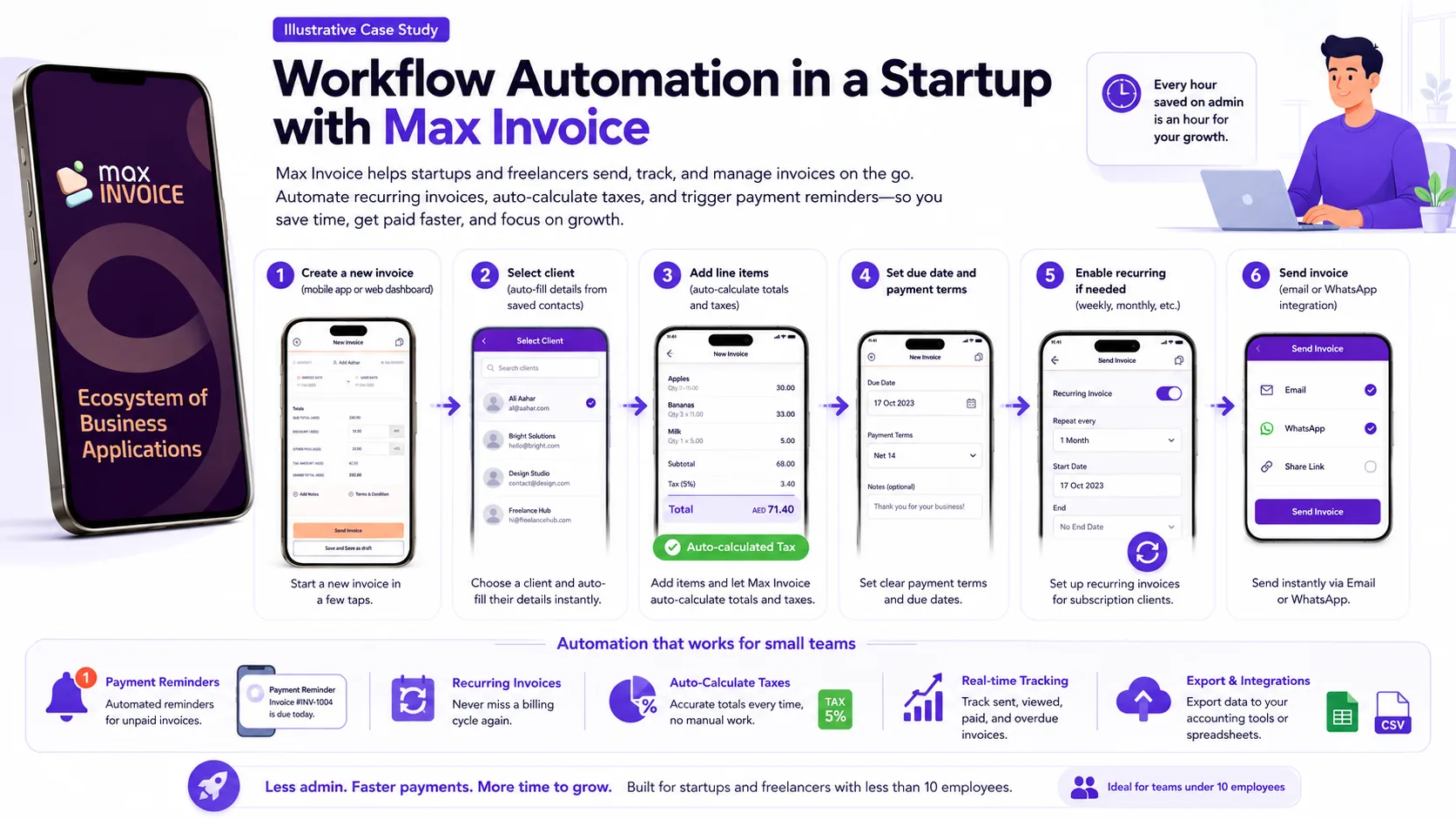
Max Invoice is designed for startups and freelancers who need to send, track, and manage invoices on the go. The app’s automation features kick in right from invoice creation. For example, you can set up recurring invoices for subscription clients, auto-calculate taxes, and trigger payment reminders—all from your phone. This means no more chasing late payments manually or copying data between spreadsheets.
Here’s a typical automation workflow pattern used by Max Invoice customers:
For a five-person services startup, this workflow can cut hours of admin each week. According to industry guides, multi-step workflow automation is now a must-have for small businesses aiming to stay lean. Max Invoice’s approach is to keep things simple: no complex setup, no-code required, and all features accessible from a mobile device.
Beyond invoicing, Max Invoice also automates expense tracking and basic reporting. This lets founders see cash flow snapshots in real time, reducing the risk of missed payments or tax deadlines. Compared to manual processes or generic spreadsheet templates, the automation built into Max Invoice gives startups a practical edge—especially when every team member wears multiple hats.
For more examples of mobile SaaS automation, see our portfolio case studies or check out related articles like Workflow Automation Software: How It Works and What to Buy in 2026 and How much does custom workflow automation cost for a small business?.
DIY vs Hiring a Custom Automation Partner: What Startups Should Consider
For startups with fewer than 10 employees, choosing between building workflow automation in-house or hiring a custom automation partner is a real crossroads. The right decision can save you months of frustration and thousands in wasted spend. Here’s how to weigh the tradeoffs for your team.
- Cost: DIY solutions using no-code tools or affordable platforms can keep upfront costs low. Many startups start with automation tools that offer free or low-tier plans, as highlighted in this guide to onboarding software for small teams. However, costs can creep up as your workflows get more complex or you need integrations outside the standard library. Hiring a partner means a larger initial investment, but you get a solution tailored to your exact needs, with fewer hidden costs down the road.
- Time to Value: DIY is usually faster for simple automations—think onboarding emails or basic task routing. But if your team is already stretched thin, even small projects can drag on. A custom partner brings proven frameworks and can deliver a working solution in weeks, not months, freeing your team to focus on growth.
- Expertise and Maintenance: Most founders and early team members aren’t automation experts. DIY can work for straightforward needs, but troubleshooting, scaling, and maintaining automations can eat up valuable time. Partners bring deep experience, handle edge cases, and offer ongoing support—especially important as your business evolves. According to SOC 2 automation experts, startups often underestimate the maintenance required to keep automations reliable as processes change.
- Customization and Scalability: Off-the-shelf tools are great for standard processes, but if you need custom logic, integrations with niche apps, or advanced reporting, you’ll quickly hit platform limits. A partner can design workflows that fit your unique business model and scale as you grow.
For most small startups, it makes sense to start with DIY for the basics—then bring in a specialist when you hit a wall or need to automate mission-critical workflows. If you’re unsure where to draw the line, or want a second opinion on your current stack, contact Prompt Gurru or book a free discovery call for practical advice on what to automate, when to hire, and how to keep costs under control.
Want more context on automation strategy? See our related articles: How to Conduct a Workflow Audit to Identify Automation Opportunities for SMBs and When to Hire a Custom Software Developer vs Buying SaaS Tools: Pricing, Tools, and Decision Steps.
FAQ: Affordable Workflow Automation Software for Startups
What is the cost of workflow automation software for startups under 10 employees?
Most affordable workflow automation tools for small startups use subscription pricing. For example, Zapier offers a free plan and paid tiers that scale with usage (see Zapier pricing). n8n provides a free self-hosted Community edition, with paid cloud options as of July 2026 (see n8n pricing). Microsoft Power Automate starts at $15 per user/month for cloud flows (see Power Automate pricing). Always check the vendor site for current details and factor in any extra costs for hosting or premium integrations.
How long does it take to implement workflow automation?
For most startups under 10 employees, setting up basic automation can take anywhere from a few hours to a few days, depending on the complexity and number of workflows. Tools like Zapier and Make are designed for quick setup, while more advanced or custom workflows may require additional planning and testing. According to guides like this workflow automation roundup, small teams can often automate key processes within a week.
Which automation tools are best for small startups?
Popular and affordable options include Zapier, Make (see Make pricing), and n8n. Each offers a range of integrations and templates suitable for startups with limited resources. For teams needing more visual workflow design, Make and n8n are strong choices. If you want a no-code, plug-and-play experience, Zapier is often the fastest to get started. For more tool comparisons, check out this onboarding software guide.
Can these tools integrate with existing software?
Yes, most workflow automation software for startups supports hundreds of integrations with popular apps—like Gmail, Slack, Google Sheets, and CRMs. However, the depth of integration varies by platform and plan. Always review the integration lists and test your most critical connections before committing. For more on integration capabilities, see this lifecycle management overview.
When should a startup hire a custom automation partner?
If your workflows are highly specific, require custom logic, or you need integrations not covered by off-the-shelf tools, it may be time to consult an automation partner. Startups often reach this point when scaling, or when manual workarounds become a bottleneck. For a detailed breakdown of the decision, see our article When to Hire a Custom Software Developer vs Buying SaaS Tools.
About the author
Prompt Gurru Team is a specialist studio in AI automation and custom software for startups and SMEs. With over 10 years of experience, our team has shipped more than 50 projects across mobile SaaS, workflow automation, and digital product builds for founders worldwide.
Our portfolio includes Max Invoice (mobile invoicing for SMBs), Max HR (workforce automation), Mindway (wellness/EAP), and full-stack workflow automation for agencies and product teams. We are trusted by clients in 25+ countries and have delivered solutions live on Google Play, the App Store, and the web.
Prompt Gurru specializes in n8n workflow automation, OpenAI API integrations, CRM and marketing automation, and custom mobile/web app development. If you want to automate your startup workflows or scope a custom solution, contact us or book a free discovery call to discuss your needs.
Ready to automate your business?
We build n8n workflows, AI pipelines, Flutter apps, and custom software for startups and SMEs - like the system that powers this blog.
Book a free discovery call